

How to Choose the Best SaaS Team Management Software
What Is SaaS Team Management Software?
If your team is still juggling spreadsheets, endless email threads, and scattered chat messages, you’re not alone. Many businesses reach a point where managing tasks, deadlines, and communication becomes chaotic. That’s exactly where SaaS team management software enters the picture. These platforms are cloud-based tools designed to organize projects, assign tasks, track progress, and keep team communication centralized.
Instead of installing complicated programs on every computer, SaaS tools operate through a browser or mobile app. This means your team can access everything from anywhere—whether they’re in the office, working remotely, or traveling. In practical terms, it’s like having a digital command center for your entire team. Managers can assign work, employees can update progress, and everyone can see the big picture in real time.
Think of SaaS team management software as the operating system for teamwork. Just as your smartphone organizes apps, messages, and notifications into one place, these tools bring together tasks, collaboration, files, and communication into a unified workspace. This consolidation is crucial for productivity because fragmented workflows often lead to missed deadlines and miscommunication.
What makes these tools especially powerful is their ability to integrate with other services like CRM platforms, email, and analytics dashboards. Instead of switching between multiple applications, teams can operate from a single platform. This streamlined approach significantly improves efficiency and transparency across departments.
Why Businesses Are Switching to SaaS Collaboration Tools
Organizations across the world are rapidly adopting SaaS team management platforms—and the reasons are compelling. Businesses today operate in a digital-first environment where speed, flexibility, and collaboration determine success. Traditional project management methods simply cannot keep up with this pace.
One major advantage is accessibility. SaaS tools allow teams to collaborate in real time from anywhere. Whether employees are in different cities or different continents, they can still work together seamlessly. This capability has become essential as remote and hybrid work models become the new norm.
Another factor driving adoption is scalability. Unlike traditional software, SaaS platforms grow with your business. If your company expands from five employees to fifty, you can easily add users, features, and storage without rebuilding your infrastructure. This flexibility makes SaaS solutions particularly attractive for startups and growing businesses.
Companies also benefit from continuous updates. SaaS providers regularly release new features, performance improvements, and security upgrades without requiring manual installations. In other words, the software evolves alongside your business needs. Over time, these updates enhance productivity while reducing the burden on internal IT teams.
The Rapid Growth of SaaS Collaboration Platforms
Market Statistics and Industry Trends
The explosive growth of team collaboration software reflects how essential these tools have become in modern business operations. According to industry research, the global team collaboration software market was valued at around $36.1 billion in 2024 and is projected to reach $57.4 billion by 2030, growing at a compound annual growth rate of approximately 7.4%.

Other market analyses suggest even stronger growth. Some forecasts predict the industry could exceed $60 billion by 2032, fueled by increasing digital transformation and the widespread adoption of remote work models. (fortunebusinessinsights.com) These numbers reveal a simple truth: businesses everywhere are investing heavily in tools that make teamwork more efficient.
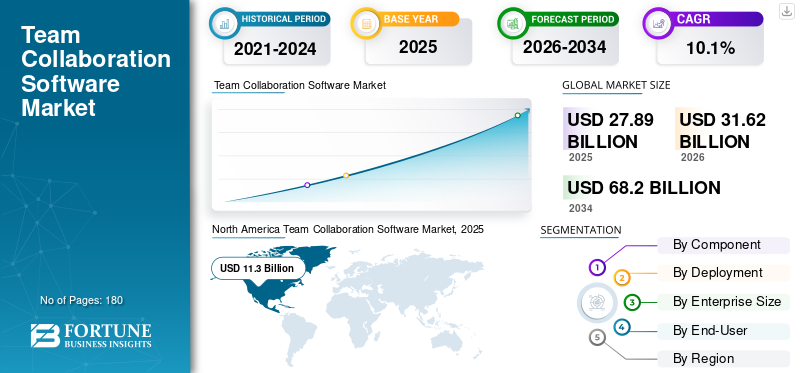
Another interesting statistic highlights just how frequently these platforms are used. Modern task management systems now support over two billion tracked tasks globally, while cloud-based collaboration tools are accessed by tens of millions of users every day. (Market Reports World) This massive scale shows how deeply integrated these tools have become in everyday business operations.
The growth of artificial intelligence within collaboration tools is also reshaping the industry. Many modern platforms now offer features like automatic task suggestions, meeting summaries, and workflow automation. These capabilities reduce manual work and allow teams to focus on more strategic activities rather than administrative tasks.
The Rise of Remote and Hybrid Workforces
If you rewind a decade, most teams worked in the same office building. Fast forward to today, and the workplace looks completely different. Remote work, freelance collaboration, and distributed teams have become standard operating models for many companies. This shift has dramatically increased the need for digital collaboration tools.
When employees are physically separated, communication gaps can quickly emerge. Without the right systems in place, important updates get lost in emails or messaging apps. SaaS team management platforms solve this problem by creating a centralized workspace where every project, conversation, and document lives together.
Imagine a project team spread across three continents. Without a collaborative platform, coordinating deadlines would be a nightmare. With SaaS software, however, every team member can see task assignments, progress updates, and timelines in real time. This transparency reduces confusion and keeps everyone aligned.
Another advantage is accountability. When tasks are tracked digitally, managers can easily see who is responsible for each assignment and how progress is moving. This visibility encourages ownership and ensures projects stay on track—even when team members never meet face-to-face.
Key Features to Look for in SaaS Team Management Software
Task and Project Management Capabilities
The core function of any SaaS team management software is to organize work efficiently. Without strong task management features, even the most visually appealing platform will fail to deliver real value. At a minimum, the software should allow users to create tasks, assign responsibilities, set deadlines, and track progress through different stages.
Advanced platforms go further by offering visual workflows like Kanban boards, Gantt charts, and timeline views. These visual tools make it easier to understand project progress at a glance. For example, a marketing team might use a Kanban board to track content creation stages—from brainstorming and writing to editing and publishing.
Another important feature is dependency management. In complex projects, certain tasks cannot start until others are completed. Good software allows managers to link tasks together so delays automatically adjust timelines. This prevents scheduling conflicts and ensures projects move smoothly.
Reporting capabilities are also crucial. Managers should be able to generate performance insights showing which projects are on track, which tasks are overdue, and how resources are being allocated. These analytics help organizations make data-driven decisions instead of relying on guesswork.
Communication and Collaboration Tools
Communication sits at the heart of teamwork, and modern SaaS platforms increasingly combine project management with built-in collaboration tools. Instead of switching between email, messaging apps, and task trackers, teams can communicate directly within the project workspace.
For example, team members can leave comments on tasks, tag colleagues, and share files without leaving the platform. This keeps conversations tied to the work itself rather than scattered across multiple channels. When someone revisits a project later, the entire discussion history is easily accessible.
Real-time collaboration is another powerful feature. Some platforms allow multiple users to edit documents simultaneously, similar to working together on a shared whiteboard. This capability dramatically speeds up decision-making because feedback happens instantly rather than through long email chains.
Video conferencing and integration with communication platforms also play a major role. Many SaaS tools connect seamlessly with apps like Slack or Zoom, allowing teams to launch meetings or share updates directly from the project dashboard.
Automation and Workflow Integration
Automation has quickly become one of the most valuable features in modern SaaS tools. Instead of manually updating tasks or sending reminders, automated workflows handle these repetitive actions automatically.
For instance, when a task is marked as complete, the software can automatically assign the next task in the sequence to another team member. Similarly, overdue tasks can trigger notifications to ensure nothing falls through the cracks.
Integration with other tools is equally important. Most companies already rely on multiple digital platforms, such as CRM systems, email marketing tools, and file storage services. SaaS team management software should integrate seamlessly with these systems to create a connected workflow.
Think of it like building a digital ecosystem. When all your tools communicate with each other, work flows naturally from one stage to the next. This interconnected approach saves time and reduces manual data entry, allowing teams to focus on higher-value activities.
Evaluating Software Based on Your Team Size
SaaS Tools for Small Teams
Choosing the right SaaS team management software depends heavily on your team size and operational complexity. Small teams typically prioritize simplicity and affordability over advanced enterprise features. For startups or small businesses with fewer than ten employees, the goal is usually to maintain visibility without overwhelming the team with unnecessary tools.
Many small teams benefit from platforms that combine multiple functions—such as task management, documentation, and communication—into one interface. This prevents the need for multiple subscriptions and simplifies onboarding for new team members. Free or low-cost plans often provide enough functionality to handle daily operations.
Another key consideration is ease of use. If the software requires weeks of training, small teams may struggle to adopt it effectively. The best tools offer intuitive interfaces where team members can quickly create tasks, assign responsibilities, and track progress without technical expertise.
Scalability is also worth considering even for small teams. A platform that works today should still be useful when the team grows. Otherwise, businesses may face the disruptive process of migrating projects and data to a new system later.
Enterprise-Level SaaS Platforms
Large organizations operate on a completely different scale. Instead of managing a few projects, they may oversee hundreds of initiatives across multiple departments and geographic regions. Enterprise teams therefore require more advanced functionality and robust infrastructure.
Enterprise SaaS platforms typically include features such as resource management, advanced reporting, and role-based access control. These capabilities help large organizations maintain structure while ensuring sensitive data remains secure. Administrators can control who has access to specific projects or information, reducing the risk of unauthorized changes.
Another essential feature for large organizations is integration with existing enterprise systems. Many companies already use CRM platforms, HR systems, and financial software. A good SaaS team management platform should connect seamlessly with these systems to maintain consistent data across the organization.
Performance and reliability also become critical at scale. Enterprise platforms must handle thousands of users simultaneously without slowing down. Reliable uptime, strong security protocols, and responsive customer support are therefore essential factors when evaluating software for larger teams.
Comparing Popular SaaS Team Management Platforms
Asana vs Trello vs Monday.com
Three names frequently appear when discussing SaaS team management software: Asana, Trello, and Monday.com. Each platform offers unique strengths, making them suitable for different types of teams and workflows.
Asana is widely recognized for its structured project management capabilities. It offers timeline views, workload tracking, and detailed reporting tools that help managers oversee complex projects. Teams that require advanced planning and coordination often prefer Asana because of its flexibility and powerful features.
Trello, on the other hand, is known for its simplicity. Built around a Kanban-style board system, it allows teams to organize tasks using drag-and-drop cards. This visual approach is especially popular among creative teams or startups that prefer lightweight project management without unnecessary complexity.
Monday.com positions itself as a highly customizable work management platform. Users can design their own workflows, dashboards, and automation rules. This flexibility makes it attractive for companies that want a system tailored to their unique processes rather than adapting to rigid software structures.
Feature Comparison Table
| Feature | Asana | Trello | Monday.com |
|---|---|---|---|
| Ease of Use | Moderate | Very Easy | Moderate |
| Workflow Views | List, Timeline, Calendar | Kanban Boards | Multiple Custom Views |
| Automation | Advanced | Basic | Advanced |
| Integration Options | Extensive | Moderate | Extensive |
| Best For | Complex projects | Small teams | Custom workflows |
Pricing Models in SaaS Team Management Tools
Per-User Pricing vs Flat Pricing
Pricing structures vary widely across SaaS platforms, and understanding these models is crucial when selecting the right software. The most common pricing model is per-user pricing, where companies pay a monthly or annual fee for each team member using the platform.
This model works well for businesses that scale gradually because costs increase in proportion to team size. However, it can become expensive for organizations with large teams or frequent contractors. Every additional user adds to the total cost, which can significantly impact budgets over time.
Flat pricing models offer an alternative approach. Instead of charging per user, these plans allow unlimited or large numbers of users for a fixed monthly fee. This structure often benefits growing teams that expect rapid expansion because costs remain predictable regardless of how many employees join the platform.
Choosing between these models depends on your growth strategy and team structure. Companies with stable, small teams may find per-user pricing more economical, while rapidly expanding organizations often prefer flat-rate subscriptions.
Also Read : How to Build a Management Team: A Complete Guide for Business Leaders
Hidden Costs to Watch Out For
Beyond subscription fees, many SaaS platforms include additional costs that organizations should evaluate carefully. Some advanced features—such as automation tools, analytics dashboards, or premium integrations—may only be available in higher-tier plans.
Storage limits can also create unexpected expenses. If your team frequently uploads large files or maintains extensive project archives, additional storage charges may apply. Businesses should assess their data usage before committing to a specific platform.
Another hidden cost involves onboarding and training. Complex systems may require dedicated training sessions or external consultants to implement effectively. These expenses can add up quickly if not accounted for during the evaluation process.
Security, Integration, and Scalability Considerations
Data Security and Compliance
Data security is one of the most critical factors when choosing SaaS team management software. Since these platforms store sensitive company information—such as project plans, financial data, and internal communications—strong security measures are essential.
Modern SaaS tools typically include encryption, multi-factor authentication, and regular security audits to protect user data. Companies operating in regulated industries should also ensure the platform complies with standards such as GDPR or SOC 2.
Another important feature is user access control. Administrators should be able to define permissions that limit access to specific projects or documents. This helps protect confidential information while allowing teams to collaborate effectively.
Regular backups and disaster recovery capabilities also play a crucial role. Reliable platforms automatically store redundant copies of data so that information remains safe even in the event of technical failures.
Also Read : What Is Team Management and How It Works
Integration With Existing Tools
No software operates in isolation. Businesses rely on a wide range of digital tools for marketing, customer management, finance, and communication. A strong SaaS team management platform should integrate seamlessly with these systems.
For example, integration with email platforms allows tasks to be created directly from messages. CRM integrations enable sales teams to connect client information with project workflows. File storage integrations ensure documents remain accessible without duplicating data across systems.
The goal is to create a unified digital workspace where information flows effortlessly between tools. When integrations work smoothly, teams spend less time switching between applications and more time focusing on meaningful work.
Steps to Choose the Best SaaS Team Management Software
A Practical Selection Framework
Selecting the right platform may seem overwhelming given the number of options available. However, a structured evaluation process can simplify the decision. The first step is identifying your team’s specific needs. Consider the types of projects you manage, the size of your team, and the workflows you use daily.
Next, create a shortlist of potential tools based on these requirements. Compare features, pricing, integrations, and security standards. Most SaaS platforms offer free trials, allowing teams to test functionality before committing to a subscription.
During the trial period, involve multiple team members in the evaluation process. Their feedback will reveal usability issues or feature gaps that managers might overlook. Pay attention to how easily employees adopt the software because adoption ultimately determines its success.
Finally, evaluate long-term scalability. A tool that works well today should still support your business as it grows. Investing in a flexible platform ensures you won’t need to switch systems again in the near future.
Checklist for Decision Makers
Before finalizing your choice, review this quick checklist:
- Does the software support your team’s workflow?
- Is the interface easy for employees to use?
- Are integrations available for your existing tools?
- Does the pricing model fit your budget and growth plans?
- Are security and compliance standards sufficient?
Answering these questions will guide you toward a solution that aligns with both operational needs and strategic goals.
Conclusion
Choosing the best SaaS team management software is less about finding the most popular platform and more about selecting a tool that fits your team’s unique workflow. The right software acts as a digital backbone for collaboration, helping teams organize tasks, communicate efficiently, and stay aligned on shared goals.
With the collaboration software market expanding rapidly and remote work becoming increasingly common, investing in the right platform has become a strategic priority for many organizations. Companies that implement effective team management systems often see improvements in productivity, transparency, and overall project success.
Ultimately, the best approach is to evaluate tools based on real-world needs rather than flashy features. By focusing on usability, scalability, integration capabilities, and security, businesses can choose a solution that supports both present operations and future growth.
FAQs
1. What is SaaS team management software?
SaaS team management software is a cloud-based platform that helps teams organize projects, assign tasks, communicate, and track progress in one centralized workspace.
2. Why do companies use SaaS collaboration tools?
Companies use these tools to improve productivity, streamline communication, and manage projects efficiently—especially in remote or hybrid work environments.
3. What features should SaaS team management software include?
Important features include task management, workflow automation, collaboration tools, integrations with other platforms, reporting dashboards, and strong security measures.
4. Is SaaS team management software suitable for small businesses?
Yes. Many platforms offer free or affordable plans designed specifically for startups and small teams, making them accessible without large budgets.
5. How do I choose the right SaaS team management tool?
Start by identifying your team’s needs, compare features and pricing, test platforms through free trials, and ensure the software integrates with your existing workflow.