
Blooket Login Guide 2026: How to Sign In, Join Games, and Fix Access Issues
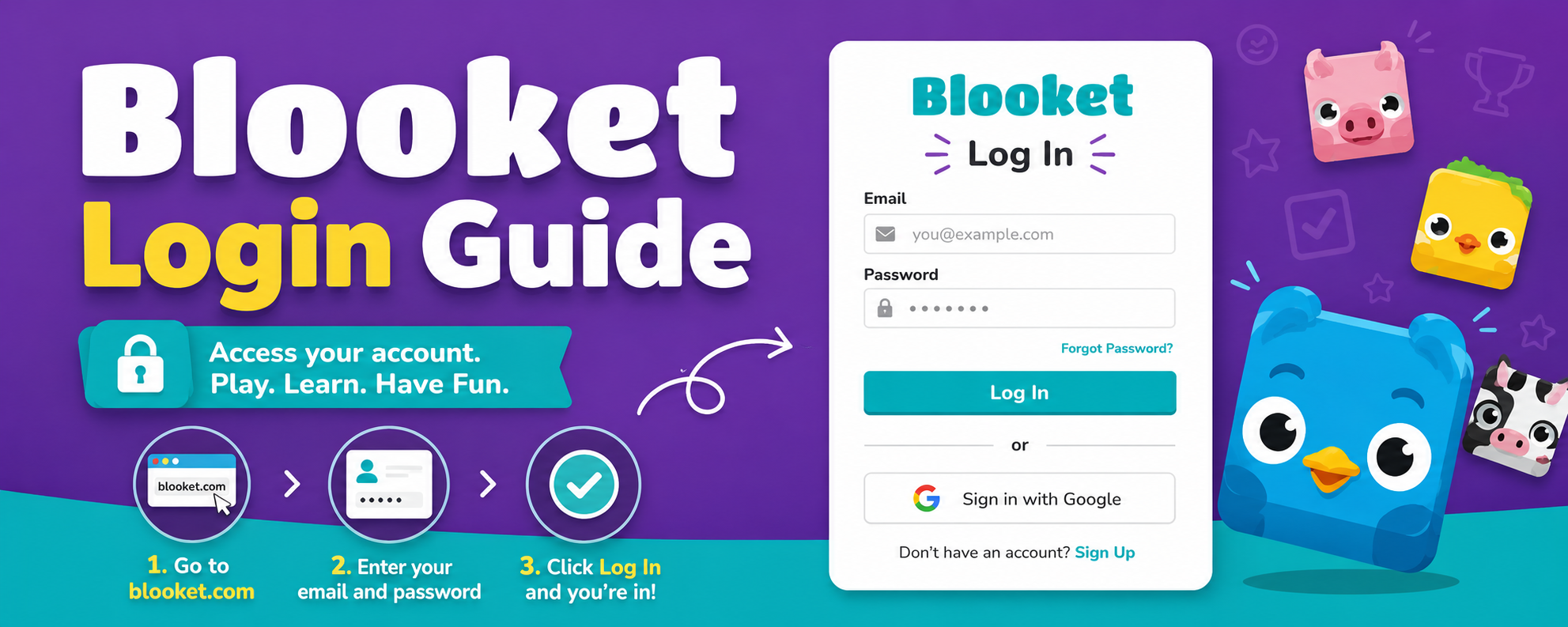
Quick answer: To log in to Blooket, go to blooket.com, click Login in the top-right corner, then sign in with either your email and password or your Google account. Teachers and registered students use this portal to reach the dashboard. To simply play a game, no login is needed — students go to play.blooket.com, type in the Game ID their host shares, and jump straight into the lobby.
That one paragraph solves the login for most people. Everything below covers the details: which portal to use and why, a full dashboard walkthrough, current 2026 pricing, real troubleshooting fixes, how different types of users (not just classrooms) are putting Blooket to work, and how it stacks up against Kahoot, Wayground, and Gimkit.
What Is Blooket, in One Minute
Blooket is a browser-based, gamified quiz platform. A host (usually a teacher, but increasingly a trainer, creator, or team lead) builds or imports a set of questions, then launches it inside one of more than 25 mini-game formats — Tower Defense, Gold Quest, Café, Battle Royale, and seasonal modes that rotate throughout the year. Players answer the same questions everyone else would see in a standard quiz, but the surrounding gameplay turns right answers into currency, power-ups, or territory. Nothing to install, works in any modern browser, and a live round can be spun up in under two minutes.
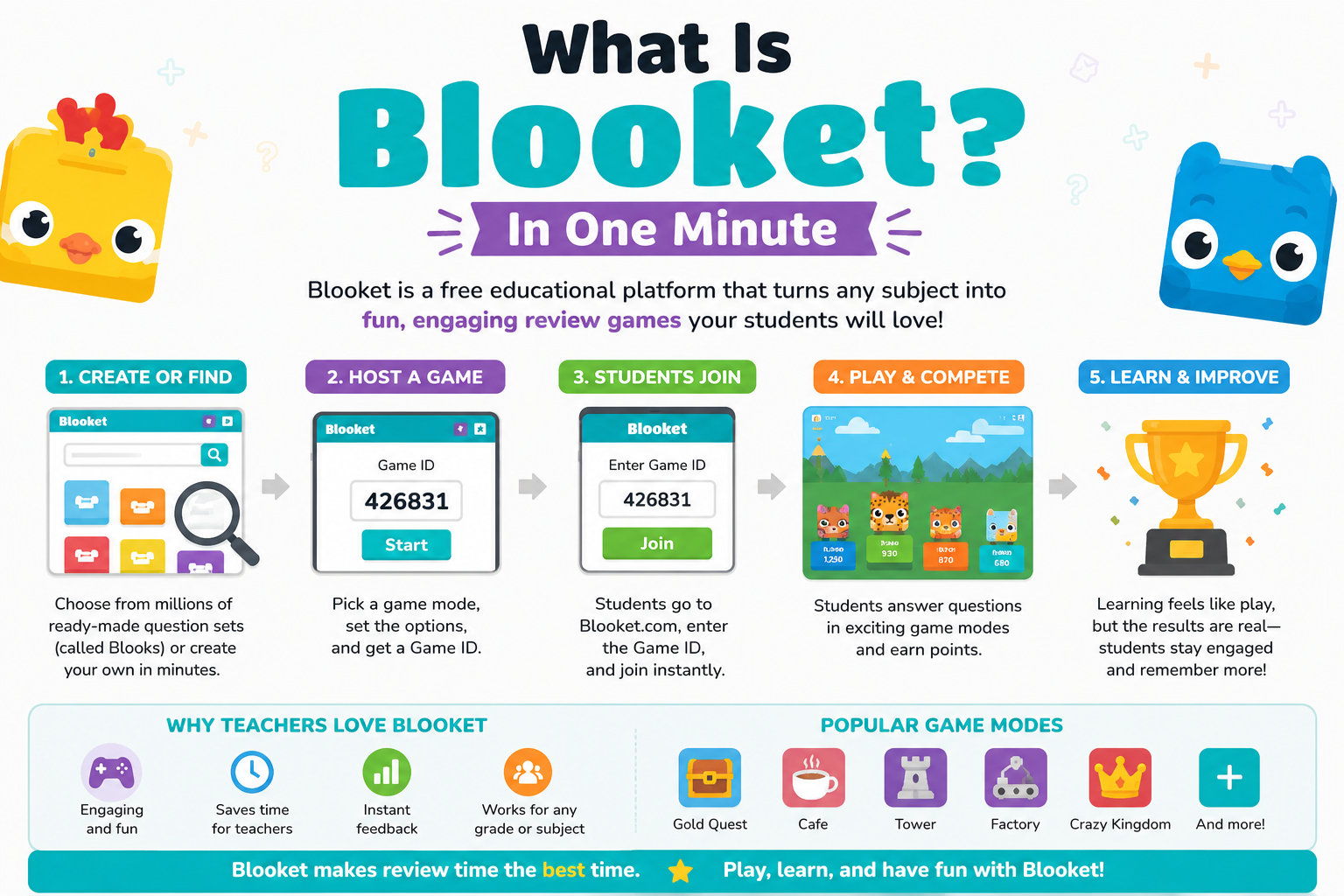
The two things people search for most — “Blooket login” and “Blooket join” — actually point to two completely separate flows, and mixing them up is the single biggest source of confusion. Let’s untangle that first.
Blooket’s Two Portals: Know Which One You Need
| Portal | Who it’s for | What happens there | Account required? |
|---|---|---|---|
| blooket.com (login page at id.blooket.com/login) | Teachers, trainers, hosts, and any student who wants to save progress | Sign in, build/import question sets, host live games, assign homework, review reports, manage settings | Yes |
| play.blooket.com | Players joining a live session | Enter a Game ID, pick a nickname, choose a Blook, wait for host to start | No |
If you’re trying to host a session, you belong on blooket.com. If someone just handed you a code to type in, skip the login entirely and head to play.blooket.com. A large share of “Blooket login not working” complaints turn out to be someone typing a game code into a password field, or the reverse.
How to Log In to Blooket (Step by Step)
Option 1: Email and Password
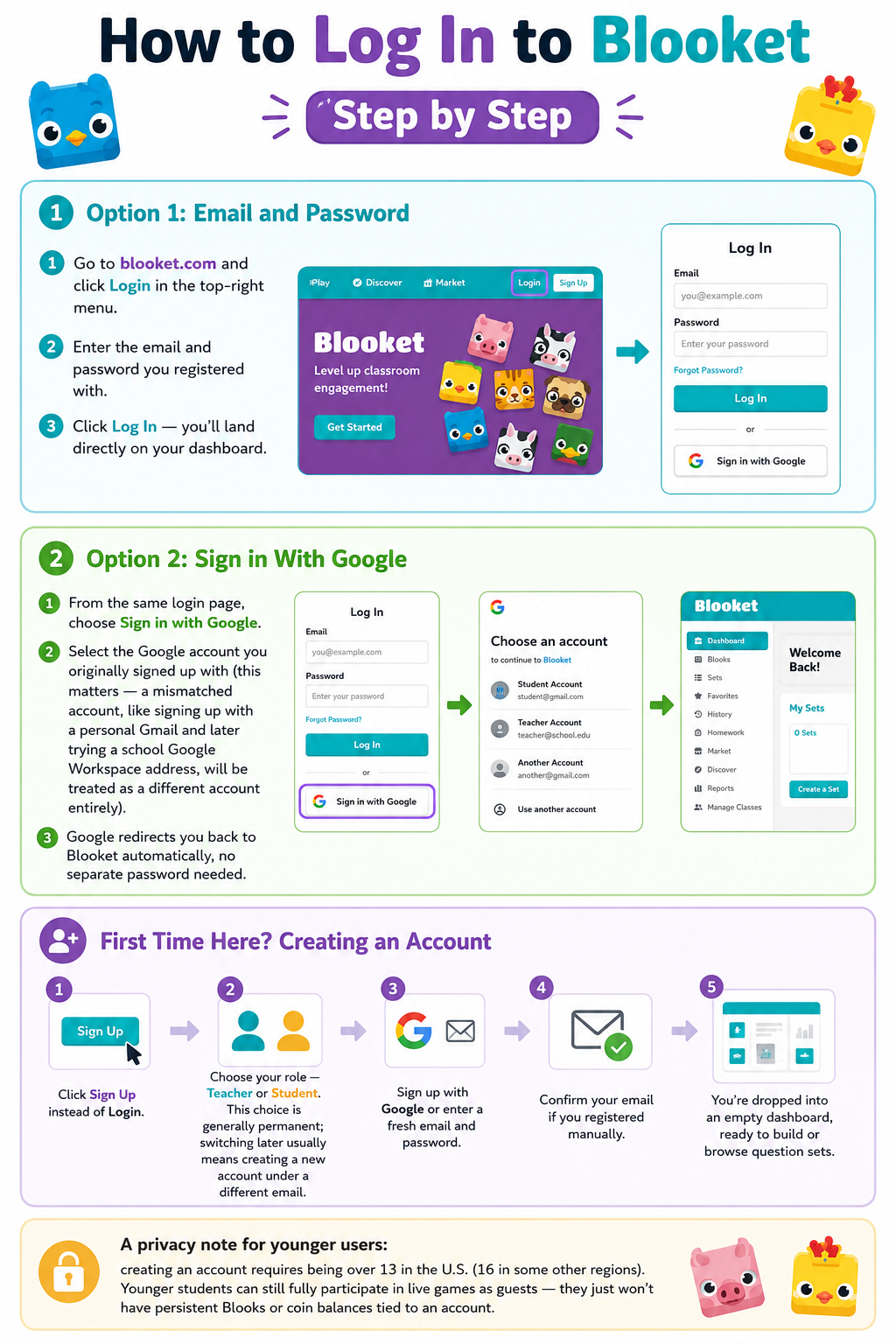
- Go to blooket.com and click Login in the top-right menu.
- Enter the email and password you registered with.
- Click Log In — you’ll land directly on your dashboard.
Option 2: Sign in With Google
- From the same login page, choose Sign in with Google.
- Select the Google account you originally signed up with (this matters — a mismatched account, like signing up with a personal Gmail and later trying a school Google Workspace address, will be treated as a different account entirely).
- Google redirects you back to Blooket automatically, no separate password needed.
First Time Here? Creating an Account
- Click Sign Up instead of Login.
- Choose your role — Teacher or Student. This choice is generally permanent; switching later usually means creating a new account under a different email.
- Sign up with Google or enter a fresh email and password.
- Confirm your email if you registered manually.
- You’re dropped into an empty dashboard, ready to build or browse question sets.
A privacy note for younger users: creating an account requires being over 13 in the U.S. (16 in some other regions). Younger students can still fully participate in live games as guests — they just won’t have persistent Blooks or coin balances tied to an account.
Joining a Game Without Logging In
This is the part most players actually need, and it’s genuinely fast:
- Open play.blooket.com on any device with a browser.
- Type in the Game ID your host shared (or scan the QR code, or click a direct join link if one was provided).
- Enter a nickname — schools often recommend initials only, for privacy.
- Pick a Blook avatar while the lobby fills.
- Wait for the host to hit Start.
The whole thing takes well under a minute, and no email, password, or age verification is required for guest play. The trade-off: guest progress doesn’t persist. Log in first if you want coins and unlocked Blooks to carry over between sessions.
Also Read : How to Reach Disquantified and What You Need to Know in 2026
Dashboard Walkthrough: What You’ll Actually See
Once logged in, the dashboard is organized into a handful of consistent panels:
| Section | What it does |
|---|---|
| Home | Snapshot of recent activity and quick links to your last-used sets |
| Discover | A searchable library of tens of millions of community-built question sets, filterable by subject and grade |
| My Sets | Where you build, edit, and organize your own content |
| History | Past game reports, including individual player accuracy |
| Homework | Self-paced assignments with start/end windows, viewable by both host and player |
| Market | Where earned tokens are spent on randomized Blook packs |
| Settings | Email, password, role, and notification preferences |
For hosts, the practical workflow is: pick or build a set → choose a game mode that fits the room’s energy → host live or assign as homework → check History afterward to spot which questions tripped people up. That loop is the entire product in a sentence, and it’s why Blooket has stayed sticky — the same content feels different every time you change the game mode wrapped around it.
Blooket Pricing in 2026: Free vs. Plus vs. Plus Flex vs. Group Plans
The core platform has always been free, and that hasn’t changed. What you’re paying for with a paid tier is capacity and reporting depth, not access to the platform itself.
| Plan | Price | Player cap | What you unlock |
|---|---|---|---|
| Free (Starter) | $0 | Up to 60 players per game | Core game modes, question creation, basic reports |
| Blooket Plus | $4.99/mo, billed annually at $59.88/yr | Up to 300 players | Advanced reports, audio questions, folders for organizing sets, content duplication, Plus-exclusive game modes |
| Blooket Plus Flex | $9.99/mo, billed monthly, cancel anytime | Up to 300 players | Same feature set as Plus, without the annual commitment |
| Group Plans | From $550/yr (10 seats) up to $3,000/yr (80 seats) | Same as Plus per seat | Bulk discounts for departments or whole schools; billed via invoice/purchase order |
A quick note on the “credit” or token system, since it’s a common point of confusion: the in-game tokens players earn by answering correctly have nothing to do with subscription pricing. Tokens are a cosmetic, gameplay-only currency spent in the Market on Blook packs — they don’t reduce your subscription cost or unlock paid features. Plus and Plus Flex are billed in real currency through Stripe, separate from anything earned in-game.
Compared with other classroom game platforms, Blooket’s entry-level paid tier remains the cheapest of the major players — Kahoot’s equivalent tier starts near $3.99/month billed annually with a lower feature ceiling, Wayground’s (formerly Quizizz) Super plan runs closer to $7.99/month, and Gimkit Pro sits around $9.99/month.
Features at a Glance
- 25+ game modes, refreshed every season, with roughly a third reserved for Plus subscribers
- 20+ million community-made question sets, searchable by subject and grade
- Homework mode for asynchronous, self-paced assignments with deadlines
- Guest play — zero friction for players, no account required
- Import tools, including CSV upload and Quizlet import, for building sets quickly
- Collectible Blooks — over 300 avatars, including rare seasonal “Chroma” variants, functioning as a light gamification layer
- Cross-device support — works on desktop, Chromebook, tablet, and phone browsers; no dedicated app exists, but the mobile site is fully functional
Pros and Cons
Pros
- Free tier is genuinely usable long-term, not a crippled trial
- Extremely low friction for players — join in under a minute, no signup
- Wide variety of game modes keeps the same content feeling fresh across repeated sessions
- Cheapest paid tier among direct competitors
- No chat function between players, which limits one obvious safety risk
Cons
- Only two question formats — multiple choice and typed answer — with no polls, open response, or rubric-based assessment
- Detailed analytics are locked behind Plus
- Fast-paced modes can reward speed over depth of understanding, which cuts against slower, more reflective learners
- No native mobile app, only a browser-based mobile site
- No free trial for Plus; you pay before testing premium features
Performance and Reliability
In day-to-day use, load times are typically fast because the platform is lightweight and doesn’t require downloads. Occasional server strain shows up during peak U.S. school hours (roughly 8 a.m.–3 p.m. on weekdays), when high concurrent usage across thousands of classrooms can slow game creation or joining briefly. Mobile browser performance is solid for joining games, though building or editing large question sets is noticeably easier on a full-size screen. Cross-browser compatibility is generally reliable on Chrome, Firefox, Safari, and Edge; most login glitches trace back to stale cookies or cached sessions rather than the platform itself.
Common Login and Access Issues
| Problem | Likely Cause | Fix |
|---|---|---|
| “Invalid credentials” error | Mistyped email/password, or wrong login method | Use Forgot Password, or retry with Google Sign-In if that’s how you originally registered |
| Signed in but homework doesn’t appear | Joined the live game as a guest instead of logging in first | Log in at blooket.com before entering the Homework tab |
| Page won’t load or freezes mid-game | Browser cache/cookies, weak connection, or peak-hour server load | Refresh, clear cache, try a different browser, or wait a few minutes |
| Google Sign-In keeps failing | Signed into the wrong Google account, or multiple Google sessions active | Sign out of all Google accounts, then sign back in with the exact one used at signup |
| Teacher account shows as Student | Wrong role selected during signup | Correct it under Settings, or create a new account if the role can’t be changed |
| Verification email never arrives | Delivery delay or spam filter | Check spam folder, then resend from the login page |
If none of these resolve it, checking Blooket’s official status/help channels is worthwhile before assuming it’s a problem on your end — brief platform-wide outages do happen occasionally.
Watch: Getting Set Up on Blooket
Free teacher walkthrough (account setup and hosting basics):
<iframe width=”560″ height=”315″ src=”https://www.youtube.com/embed/a2Nay_orn4A” title=”Blooket tutorial for teachers – Free Option Quick Guide” frameborder=”0″ allowfullscreen></iframe>
Student edition — joining games and collecting Blooks:
<iframe width=”560″ height=”315″ src=”https://www.youtube.com/embed/dSqDf6YSz-M” title=”How to Get Started with Blooket – Student Edition” frameborder=”0″ allowfullscreen></iframe>
Beyond the Classroom: Who Else Is Using Blooket
Blooket was built for education, but its login-and-join mechanics — quick account setup for a host, zero-friction guest access for participants — have made it useful outside traditional classrooms too.
For content creators Educators and edu-content creators building YouTube channels, TikTok study guides, or course communities use Blooket sets as embedded engagement tools, turning a video lesson or a live stream Q&A into a playable review round the audience joins instantly through a shared code.
For corporate trainers and businesses HR and L&D teams have started borrowing Blooket for onboarding quizzes and compliance refreshers. Because Plus supports up to 300 simultaneous players, it comfortably covers a company-wide training session, and the guest-join flow means new hires don’t need to create yet another workplace login just to participate.
For marketers running live events Marketers hosting webinars or in-person booth activations use the “join in seconds, no signup” mechanic to drive interactive trivia or product-knowledge games during events — the low barrier to entry keeps participation rates high compared with tools that require registration first.
For eCommerce teams Product and customer-support teams have adapted Blooket sets as an internal, gamified way to onboard staff on catalog knowledge, return policies, or new SKUs ahead of a launch — treating it as a lightweight alternative to a static training deck.
None of these are official Blooket use cases, but the same login simplicity that makes it work in a fifth-grade classroom is exactly what makes it portable to these other settings.
Blooket vs. Kahoot vs. Wayground vs. Gimkit
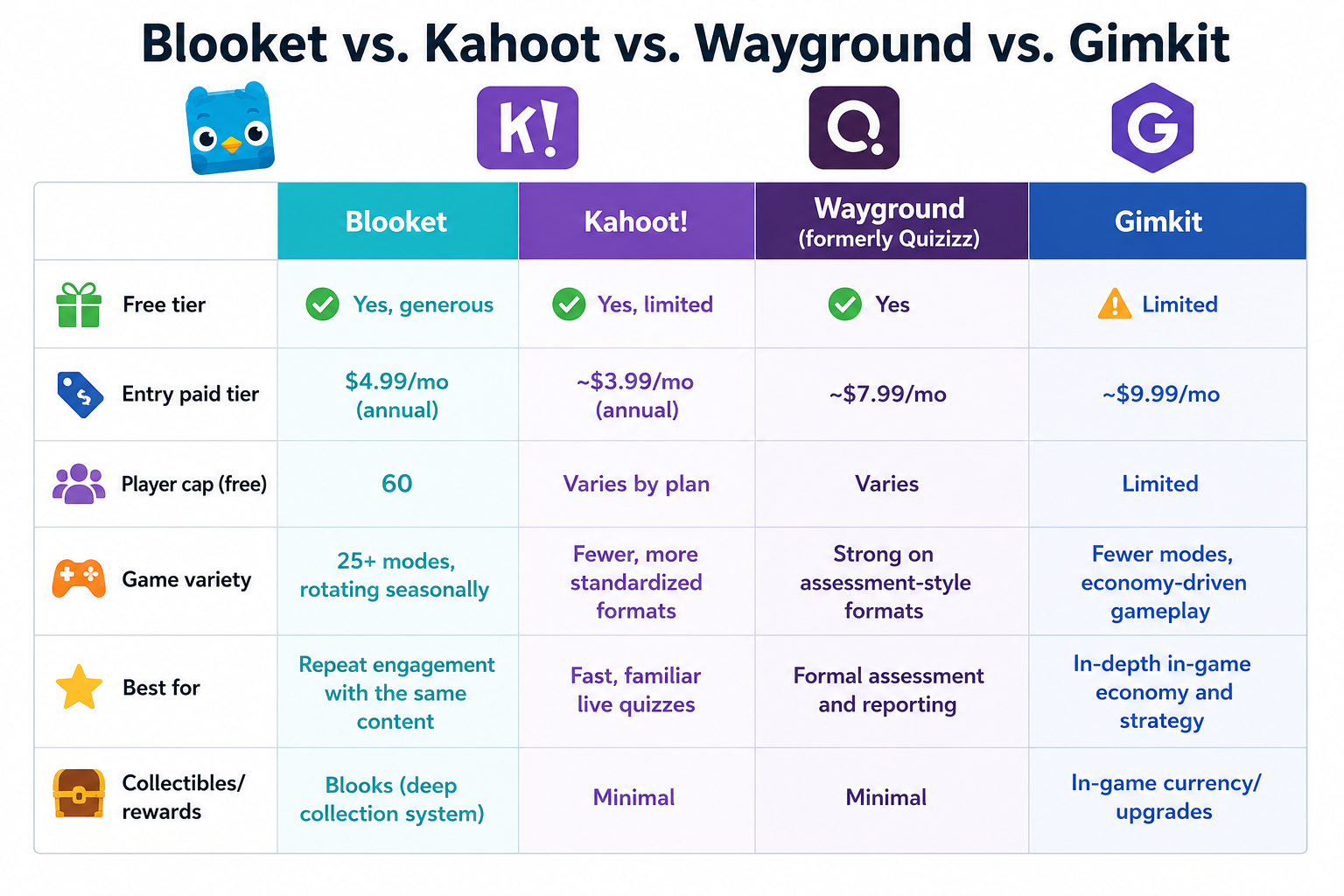
| Blooket | Kahoot! | Wayground (formerly Quizizz) | Gimkit | |
|---|---|---|---|---|
| Free tier | Yes, generous | Yes, limited | Yes | Limited |
| Entry paid tier | $4.99/mo (annual) | ~$3.99/mo (annual) | ~$7.99/mo | ~$9.99/mo |
| Player cap (free) | 60 | Varies by plan | Varies | Limited |
| Game variety | 25+ modes, rotating seasonally | Fewer, more standardized formats | Strong on assessment-style formats | Fewer modes, economy-driven gameplay |
| Best for | Repeat engagement with the same content | Fast, familiar live quizzes | Formal assessment and reporting | In-depth in-game economy and strategy |
| Collectibles/rewards | Blooks (deep collection system) | Minimal | Minimal | In-game currency/upgrades |
If your priority is variety that keeps the same question bank feeling new for weeks, Blooket edges ahead. If you need tighter formal-assessment reporting out of the box, Wayground is worth a look. If you want the simplest, most universally recognized live-quiz format, Kahoot remains the default.
Alternatives Worth Knowing About
- Kahoot! — the most widely recognized name in live classroom quizzing, strongest for fast, simple sessions
- Wayground (Quizizz rebrand) — leans further into formal assessment and detailed reporting
- Gimkit — built by former students, with a deeper in-game economy and strategy layer
- Quizlet Live — better suited to flashcard-based memorization than full game modes
FAQs
Is Blooket free to use? Yes. The core platform, including hosting live games and creating question sets, is free. Plus and Plus Flex add higher player caps and deeper reporting for $4.99–$9.99/month depending on billing frequency.
Do students need an account to play? No. Students can join any live game as a guest with just a Game ID and nickname. An account is only needed to save coins, unlocked Blooks, and progress across sessions, or to access Homework mode.
What’s the difference between Blooket login and Blooket join? Login (at blooket.com) accesses your account dashboard for building and hosting content. Join (at play.blooket.com) is how a player enters a live game session using a code — no account required.
Why does my Google Sign-In keep failing? It almost always means you’re signed into a different Google account than the one originally linked to your Blooket profile. Sign out of all Google sessions and sign back in with the correct one.
Do Blooks affect gameplay or scoring? No. Blooks are entirely cosmetic collectibles. Final scores are determined purely by quiz performance and the mechanics of the chosen game mode.
Is Blooket safe for younger students? Blooket has no chat function between players, doesn’t require personal information to join as a guest, and follows COPPA and FERPA guidelines. Account creation requires being over the applicable age minimum, but guest play has no age gate since no data is stored.
Can I use my school Google account to log in? Yes, and it’s the fastest method for most classrooms — just make sure it’s the same Google account used at signup, since different Google addresses are treated as separate Blooket accounts.
Final Verdict
Blooket’s login system itself is refreshingly uncomplicated once you know the two-portal split: blooket.com to manage and host, play.blooket.com to simply join. Most of the “login problems” people search for aren’t really login problems at all — they’re a mismatch between the portal someone’s using and what they’re actually trying to do.
As a platform, Blooket earns its popularity through low friction on both sides: hosts can get a session running in minutes, and players can join with nothing more than a code. The free tier is strong enough to run indefinitely for smaller classes or teams, and the paid tiers remain the most affordable among direct competitors if you need higher player caps or deeper reporting. The trade-offs — limited question formats, analytics gated behind Plus, and a fast-paced style that can favor speed over depth — are worth weighing against your specific use case, whether that’s a weekly classroom review, a corporate onboarding session, or a live audience-engagement game at an event.
For anyone just trying to get logged in right now: go to blooket.com, click Login, choose email or Google, and you’re in.