
Dreamina AI vs Runway: Which Wins for Video in 2026?
Every AI video platform promises the same thing: describe a shot, get a clip back in minutes. Whether that promise holds up depends heavily on which tool you pick, so I put Dreamina AI and Runway through the same assignment and tracked exactly where each one shined and where it stumbled.
Dreamina AI is ByteDance’s creative suite, tied closely to the CapCut ecosystem, covering image generation, image animation, text-to-video, and AI avatars in one dashboard. Runway is the veteran of the AI film space — a New York studio whose Gen-4.5 model currently ranks among the top performers for cinematic realism on public leaderboards.
I wasn’t trying to crown an overall “best” tool. I wanted a practical answer: if you’re a solo creator with a laptop and no production budget, which platform actually gets your idea into a finished, shareable clip?
Quick Verdict Before the Details
Dreamina AI — Fast onboarding, usable results in under a minute, and a genuinely painless path from still image to animated clip. Quality wobbles once your prompt gets specific, and the free daily allowance disappears quickly if you experiment. Good fit for creators making everyday social content.
Runway — The most cinematic motion I’ve seen from any generator, plus a shot-sequencing tool that thinks the way a director thinks. But my free account hit a hard paywall right at the generate button, and the credit pricing punishes trial and error. Good fit for paid work where visual polish is the deliverable.
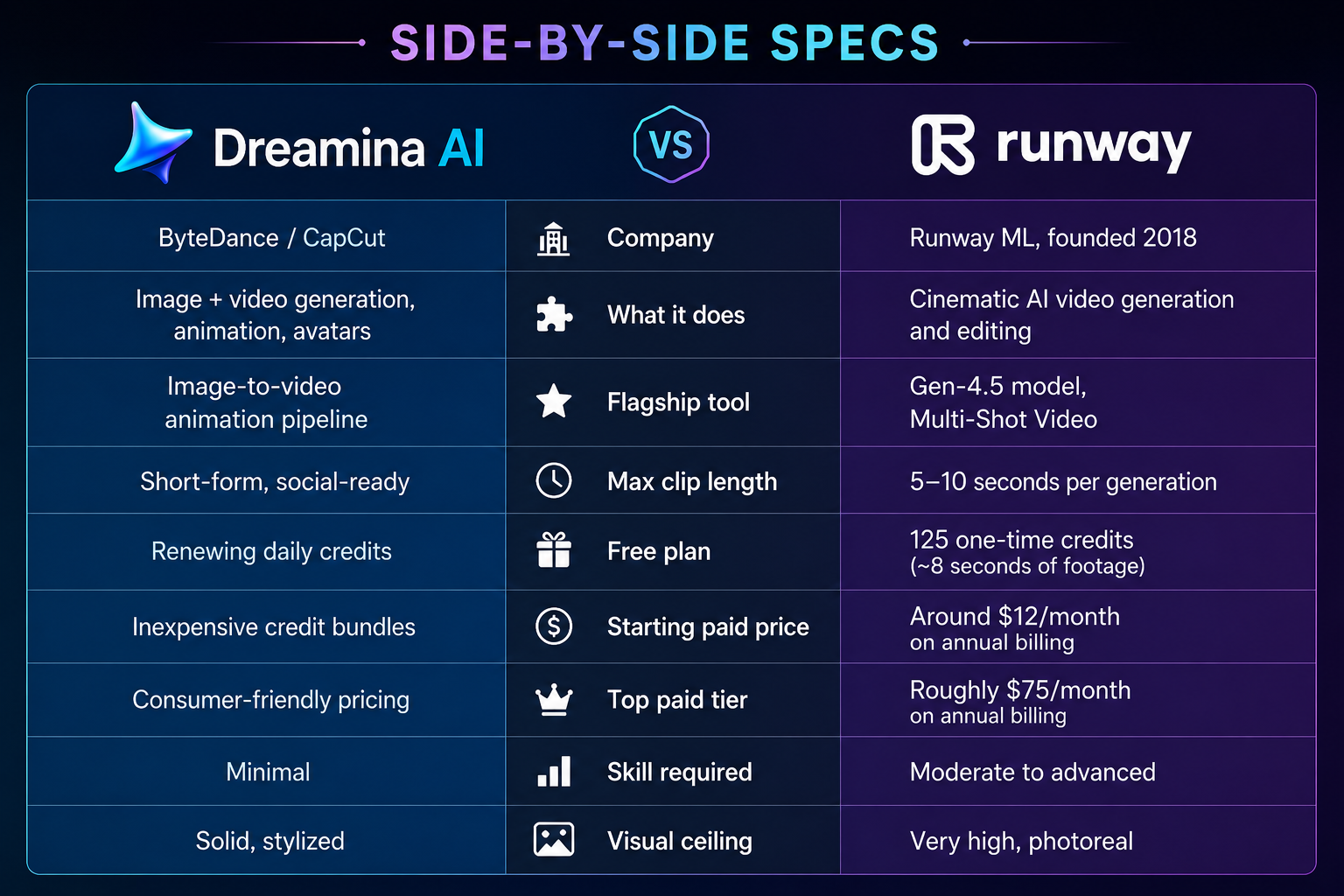
Side-by-Side Specs
| Dreamina AI | Runway | |
|---|---|---|
| Company | ByteDance / CapCut | Runway ML, founded 2018 |
| What it does | Image + video generation, animation, avatars | Cinematic AI video generation and editing |
| Flagship tool | Image-to-video animation pipeline | Gen-4.5 model, Multi-Shot Video |
| Max clip length | Short-form, social-ready | 5–10 seconds per generation |
| Free plan | Renewing daily credits | 125 one-time credits (~8 seconds of footage) |
| Starting paid price | Inexpensive credit bundles | Around $12/month on annual billing |
| Top paid tier | Consumer-friendly pricing | Roughly $75/month on annual billing |
| Skill required | Minimal | Moderate to advanced |
| Visual ceiling | Solid, stylized | Very high, photoreal |
Pricing and specs checked mid-2026 — always confirm current rates before committing.
The Test I Ran
To keep things fair, I used one creative brief across both platforms: a short product-launch teaser showing a sneaker spinning in a moody studio with dramatic light sweeps. Simple enough for a beginner tool to attempt, detailed enough to stress a professional one.
I started each session from a fresh free account, timed how long it took to get a first result, and noted every point where the platform asked for a credit card.
Round One: Dreamina AI
Signing in through CapCut credentials took under fifteen seconds — no email verification loop, no forced walkthrough. The home screen immediately offers four modes: text-to-image, image-to-video, text-to-video, and avatar creation.
I typed the sneaker brief into text-to-image first. Four variations landed within seconds, and one was close enough to use immediately. Pushing the prompt further — asking for a specific light angle and camera height — made results less predictable, and I burned through a few regenerations chasing the exact framing I wanted.
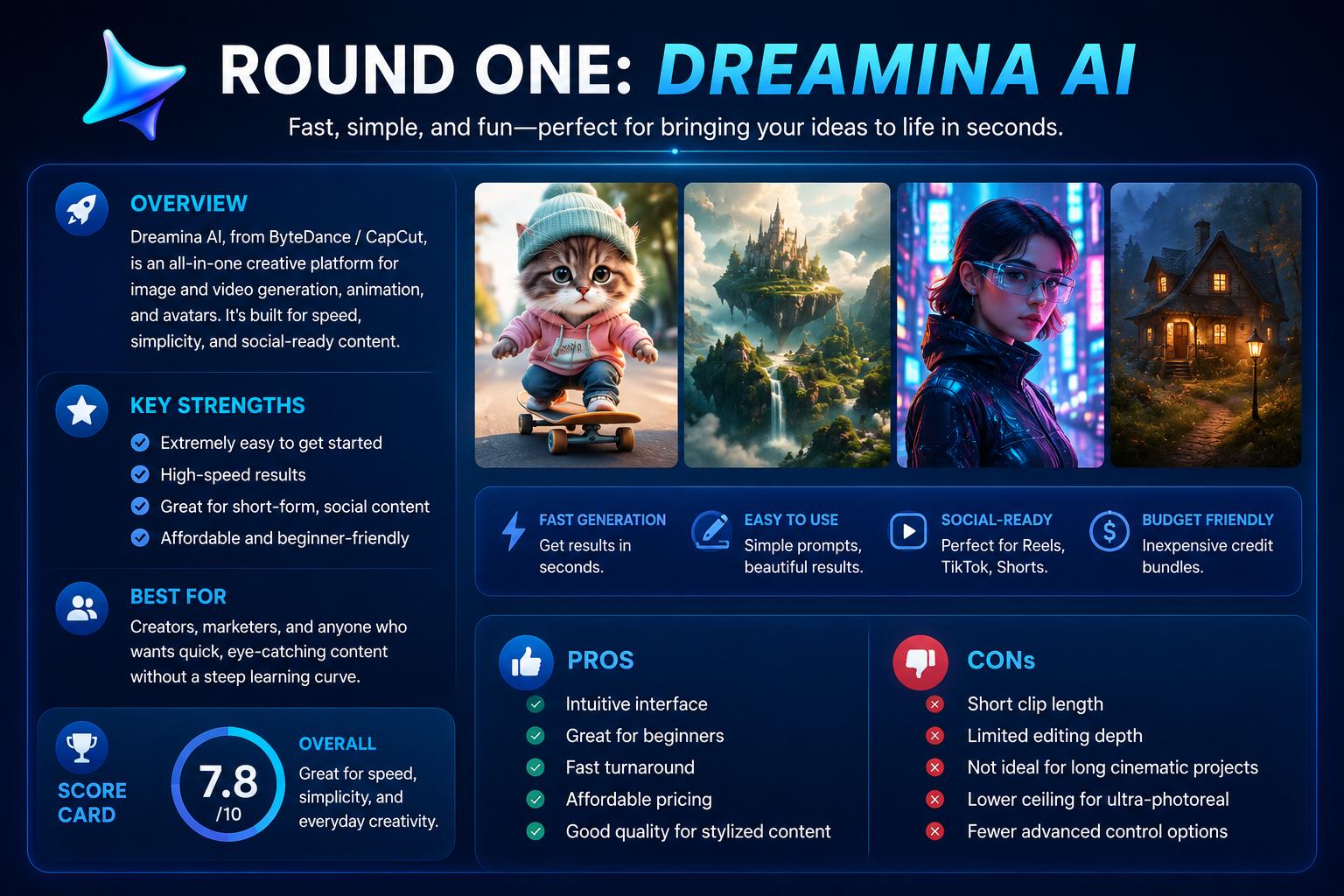
From there I sent my favorite still into image-to-video and described the motion: slow rotation, light sweeping across the shoe’s surface. The output was smoother than I expected, and the whole thing happened without leaving the tab or re-uploading anything.
I also tried the direct text-to-video mode with the same brief. It auto-added a music bed, which was a nice touch, but the motion felt more generic than what the image-to-video route produced. If your goal is a specific visual, animating a still you already like beats generating video blind.
What stood out: the workflow. Nothing else I tested lets you move from still image to animated, scored clip inside one interface that fast. What frustrated me: daily credits vanish quickly once you start iterating on anything beyond a first-draft prompt.
Also Read : Can AI Build an Entire Advertising Campaign Without Human Designers?
Round Two: Runway
Runway’s interface reads differently the moment you open it — this is built for people who already think in shots, not vibes. I picked Multi-Shot Video and set my output to a 16:9 frame at 10 seconds with audio on.
Rather than one loose sentence, Multi-Shot Video wants a structured prompt, so I broke the sneaker teaser into four explicit shots: a wide establishing shot of the studio, a close-up of the shoe starting to rotate, a side-angle pass as light sweeps across the material, and a final hero shot with the light settling.
Writing that prompt felt like drafting a real shot list, which is a genuinely different experience from typing a caption. The example reels inside the workspace looked excellent — sharp motion, believable studio lighting, none of the warping you sometimes see in generated video.
Then I hit Generate. Instead of a progress bar, I landed on a full-screen upgrade page. My 125 free credits, roughly eight seconds of standard output, weren’t enough to run the Multi-Shot feature I’d just spent ten minutes crafting a prompt for.
That’s the moment worth flagging for anyone comparing these tools on a free account: Runway lets you build the entire creative brief and only tells you it’s locked once you’re fully invested. Paid usage isn’t gentle either — Gen-4 class generation burns credits fast per second of footage, credits don’t carry over on the cheaper plans, and multiple users online report being charged even for generations that failed outright.
What stood out: the shot-list-style prompting and the visible quality ceiling. What frustrated me: a free tier that lets you prepare everything and pays off nothing.
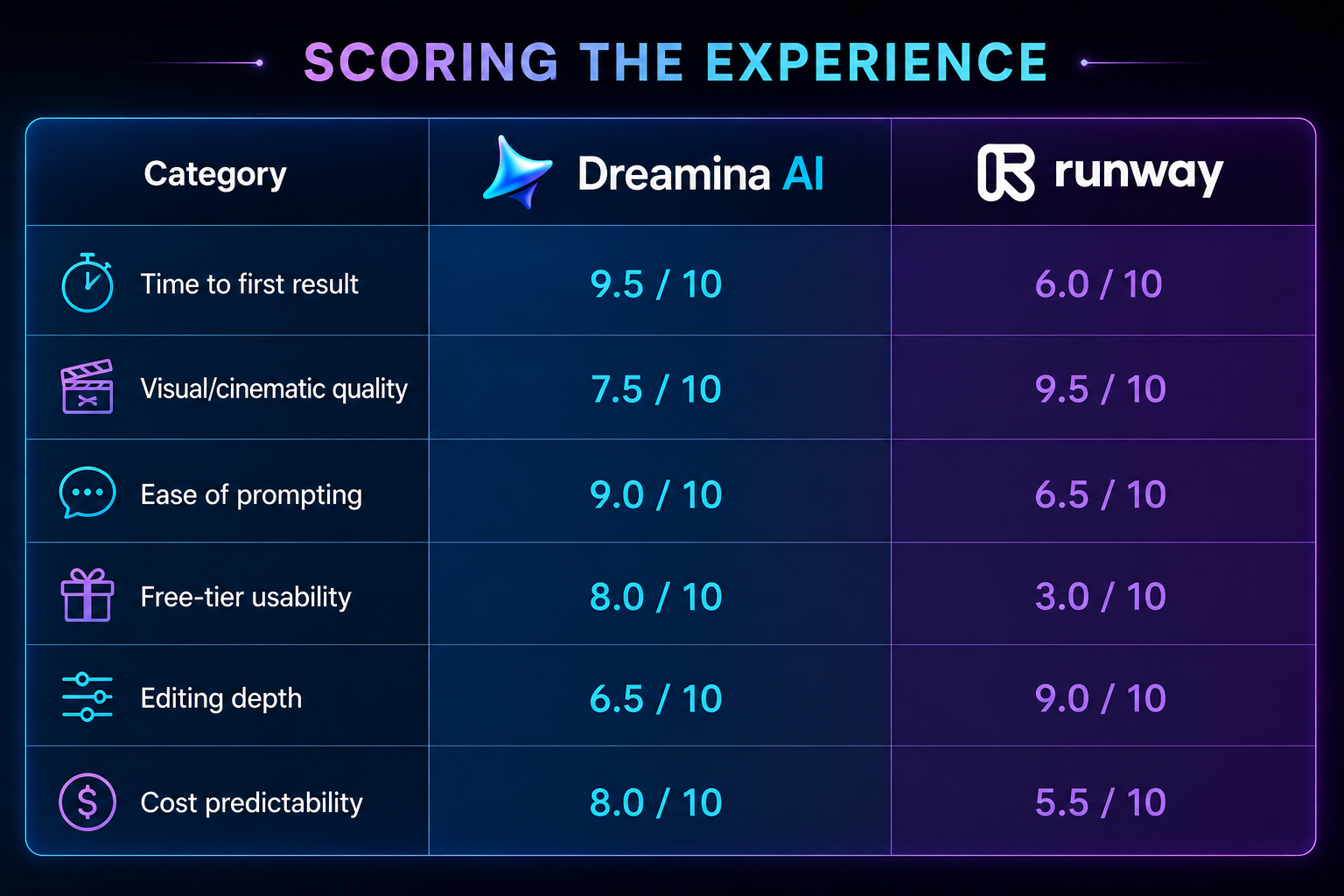
Scoring the Experience
| Category | Dreamina AI | Runway |
|---|---|---|
| Time to first result | 9.5 / 10 | 6.0 / 10 |
| Visual/cinematic quality | 7.5 / 10 | 9.5 / 10 |
| Ease of prompting | 9.0 / 10 | 6.5 / 10 |
| Free-tier usability | 8.0 / 10 | 3.0 / 10 |
| Editing depth | 6.5 / 10 | 9.0 / 10 |
| Cost predictability | 8.0 / 10 | 5.5 / 10 |
These scores reflect one tester’s hands-on session plus publicly available pricing pages — treat them as a directional read, not a lab benchmark.
Where Each Tool Actually Costs You Money
| Dreamina AI | Runway | |
|---|---|---|
| Free allowance | Resets daily | One-time, used up quickly |
| Entry paid tier | Cheap credit packs | ~$12/month, billed yearly |
| Top tier | Still consumer-priced | ~$75/month, billed yearly |
| Cost of experimenting | Regenerations eat daily quota | Per-second billing adds up fast |
| Failed generations | Retried within your free pool | Often still billed, per user reports |
Who Should Pick Which
Go with Dreamina AI if you:
- Post regularly to social platforms and need speed over perfection
- Already cut video in CapCut and want generation in the same place
- Are new to AI tools and don’t want to learn prompt structuring
- Need one tool for stills, animation, and quick video rather than several
Go with Runway if you:
- Deliver client or brand work where visual polish is non-negotiable
- Are comfortable writing structured, shot-by-shot prompts
- Have budget set aside and won’t be shocked by per-second billing
- Need editing precision, not just generation
My Honest Take
These two aren’t really fighting for the same customer. Dreamina is closer to a sketchpad — quick, forgiving, built to get an idea out of your head and onto a timeline fast. Runway is closer to a rental camera crew — the output can look genuinely professional, but you pay for every take, including the ones that don’t work.
On a free account, Dreamina handed me a finished clip. Runway handed me an invoice. That difference shapes my recommendation for anyone testing on a budget: start with Dreamina to learn what you actually want from AI video, and graduate to Runway once a project’s budget can absorb its pricing.
If I were producing something client-facing tomorrow, where cinematic quality was the entire point, I’d still choose Runway despite the cost. For everything else — the daily grind of social content, quick concepts, and rapid iteration — Dreamina is the better everyday tool.
Dreamina AI: 8.2/10 — fast, approachable, and generous enough on the free tier to actually finish something. Runway: 7.9/10 — the highest visual ceiling available, held back by a free experience that never lets you press play.