

Try Hard Guides Wordle Solver: Review and Top Alternatives in 2026
You’re on your fifth guess. Three letters are locked green, two yellows are floating somewhere in the word, and you have exactly one attempt left before your streak disappears. Sound familiar?
Millions of Wordle players face this moment every day — and many of them quietly turn to a Wordle solver. But not all solvers are created equal. Some are glorified random-word generators. Others are bloated with ads and popups. And a few, like the Try Hard Guides Wordle Solver, actually try to be something more useful: a thinking companion rather than a cheat code.
This article takes an in-depth look at the Try Hard Guides Wordle Solver — how it works, what it does well, where it falls short, how it compares to alternatives, and who should actually be using it in 2026.
What Is the Try Hard Guides Wordle Solver?
The Try Hard Guides Wordle Solver is a free, browser-based word puzzle assistant hosted at tryhardguides.com. It was created to help players narrow down possible Wordle answers using the clue feedback from their guesses — the green, yellow, and grey letter system that the game uses.
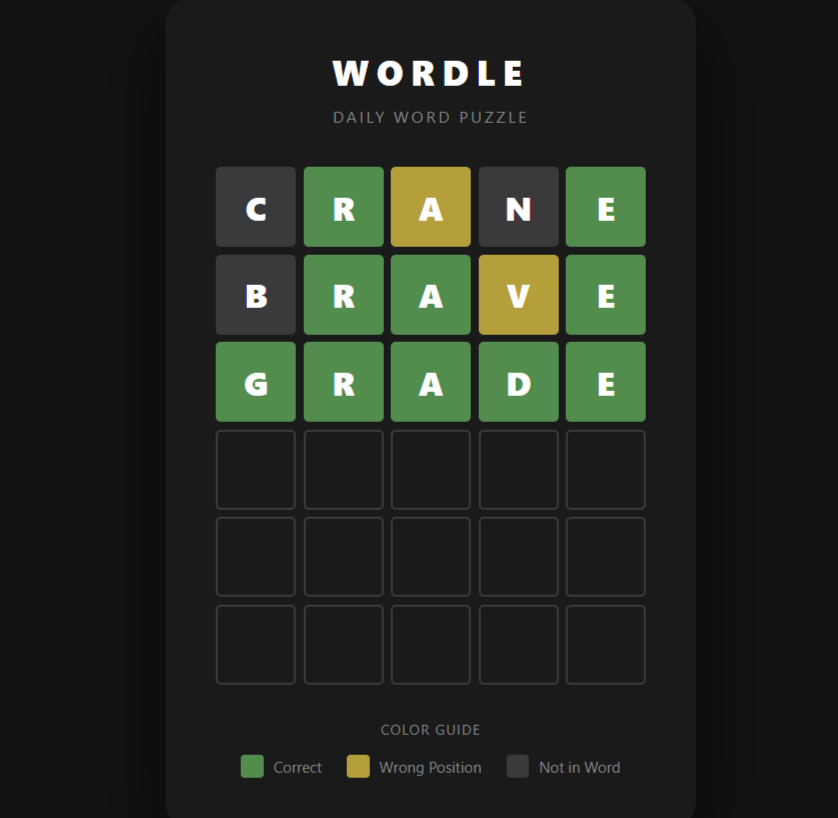
Rather than just spitting out the day’s answer, the tool works the way a thoughtful player would: it takes what you know, filters out what doesn’t fit, and presents a ranked list of the most probable remaining options.
The site itself covers a wide range of daily puzzles and game guides, but the Wordle Solver stands as one of its most-visited and long-running tools, having been published in early 2022 and updated continuously since.
Cost: Completely free — no sign-up, no credits, no paywall.
Platform: Browser-based; works on desktop and mobile.
Word Length Support: 4, 5, 6, and 7-letter word modes.
Also Read : The Definitive Guide to the Best AI Headshot Generators in 2026
How the Try Hard Guides Wordle Solver Works
Using the tool takes about 30 seconds once you understand the three input categories:
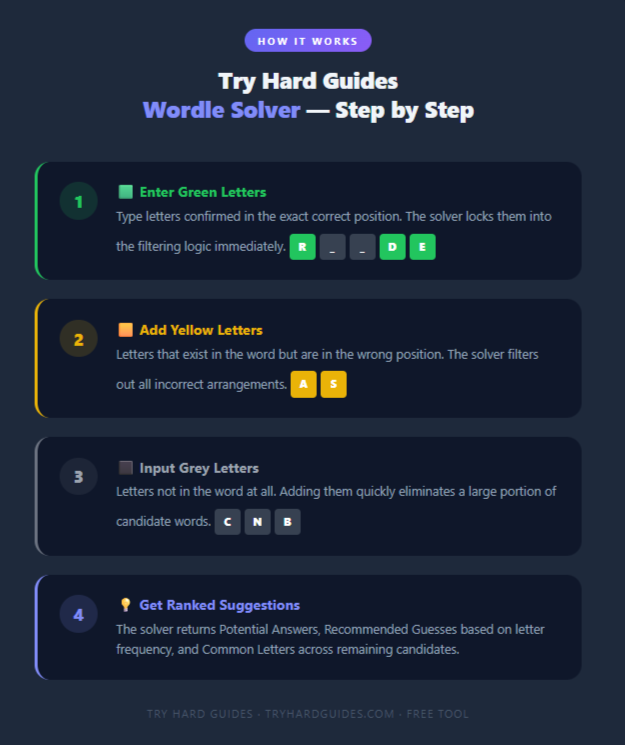
Step 1 — Enter Your Green Letters
Type the letters you’ve confirmed are in the correct position. These go into their fixed slots, and the solver immediately locks them into its filtering logic.
Step 2 — Add Yellow Letters
Enter any letters you know exist in the word but are in the wrong place. The solver uses this to exclude arrangements where those letters appear in their incorrectly-guessed positions.
Step 3 — Input Grey Letters
These are the letters that don’t appear anywhere in the word. Adding them eliminates a large chunk of the candidate list quickly.
Step 4 — Review the Output
The tool generates a filtered list of matching words and breaks the results into three useful sections:
- Potential Answers — every word that satisfies your clues
- Recommended Guesses — the solver’s top picks based on high-frequency letter probability
- Common Letters — a frequency count of which letters appear most often across the remaining candidates
Bonus Features
- A “Contains Letters” toggle lets you specify how many times a particular letter appears in the word — useful for words with double letters
- You can switch between Wordle-only mode (answers limited to the official Wordle answer set) and a broader dictionary mode
- The tool supports 4 to 7-letter word modes, making it usable for Dordle, Quordle, and other word games
Key Features at a Glance
| Feature | Details |
|---|---|
| Input Types | Green (correct position), Yellow (wrong position), Grey (absent) |
| Word Length Modes | 4, 5, 6, and 7 letters |
| Recommended Guesses | Based on letter frequency analysis |
| Common Letters Display | Shows frequency across remaining candidates |
| Contains Letters Filter | Specify exact or minimum letter count |
| Wordle-Only Mode | Toggle to limit answers to official Wordle list |
| Cost | 100% free |
| Registration Required | No |
| Mobile Support | Yes (limited optimization) |
Performance Analysis: How Well Does It Actually Work?
Accuracy and Filtering Speed
The core filtering engine is fast and responsive. Enter your clues and the list updates instantly — there’s no loading time or server delay. For most mid-game scenarios (after 2–3 guesses), the tool rapidly narrows thousands of possible words down to a handful of strong candidates.
In standard 5-letter Wordle scenarios, the recommended guesses consistently prioritize words containing high-frequency Wordle letters like E, A, R, T, O, S, and N. This mirrors the logic that experienced players use organically, making the tool feel aligned with sound strategy rather than brute force.
Letter Frequency Logic
The “Recommended Guesses” feature is genuinely useful. Instead of presenting a random subset of valid words, it surfaces words that are most likely to eliminate the most unknown letters in a single guess. This is a meaningful edge, particularly in the mid-game when you have several remaining possibilities and need to choose a guess that reveals the most new information.
Dictionary Coverage and Accuracy
Here’s where the tool shows its most significant weakness. The solver’s internal word list doesn’t always perfectly match the official New York Times Wordle dictionary. Occasionally, a suggested word won’t be accepted when typed into the actual game — which is particularly frustrating on your final guess.
This isn’t unique to Try Hard Guides (most third-party solvers face this issue), but it’s worth being aware of. If you’re using the solver in a high-stakes moment, always mentally cross-check whether the suggested word feels like a real, common word before using it.
Mobile Experience
The mobile interface is functional but not polished. Input buttons can feel slightly cramped on smaller screens, and the layout occasionally requires extra scrolling to see all the output sections. Desktop use is noticeably more comfortable. This is an area where competing tools have invested more heavily in responsive design.
Also Read : Can This Instagram Story Viewer Really Keep You Hidden in 2026?
Pros and Cons
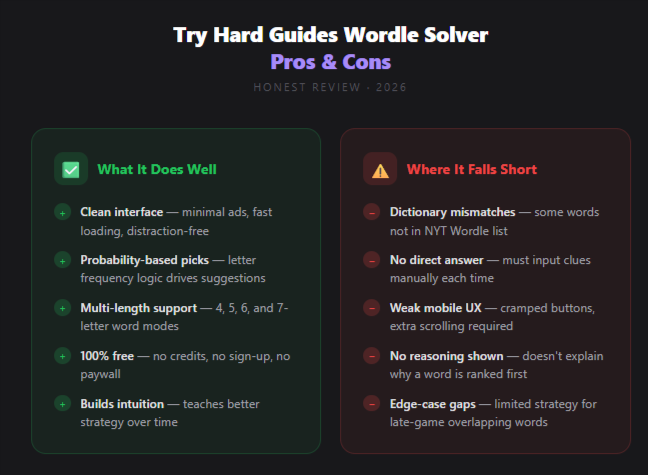
✅ What the Try Hard Guides Wordle Solver Does Well
Clean, distraction-free interface. Many solver sites are buried under pop-up ads and autoplaying videos. Try Hard Guides keeps things readable, fast-loading, and easy to navigate — a genuine differentiator in a noisy space.
Probability-based recommendations. The recommended guesses aren’t random. They reflect letter frequency logic that helps you get the most information out of each remaining attempt.
Multiple word-length modes. The ability to switch between 4, 5, 6, and 7-letter modes makes this useful beyond standard Wordle — great for Quordle, Dordle, or any variant that uses different word lengths.
Genuinely free. There are no premium tiers, no credit systems, and no annoying upsells. The entire tool is accessible without creating an account.
Teaches strategy over time. Repeated use naturally improves your sense of which starting words work best and how vowels tend to distribute in common English words. It builds intuition rather than just handing you answers.
❌ Where the Tool Falls Short
Occasional dictionary mismatches. Some suggestions aren’t in the official NYT Wordle answer list, which can cause a wasted guess at a critical moment.
No daily answer lookup. The solver won’t just tell you today’s answer — you have to input your clue data. Some users prefer a direct answer tool, especially if they’re stuck early.
Mobile UX needs work. The interface is functional on phones but clearly designed with desktop in mind. Touch-friendly optimization would significantly improve the mobile experience.
No explanation of suggestions. The tool tells you what to guess but doesn’t explain why a particular word ranked higher than another. For players who want to learn the reasoning, this is a missed opportunity.
Limited edge-case strategy. In certain late-game scenarios with many overlapping possibilities, the tool sometimes cycles through similar word families instead of suggesting radically different elimination strategies.
Who Should Use the Try Hard Guides Wordle Solver?
Casual Daily Players
If you play Wordle every morning for fun and occasionally hit a wall, this tool is a perfect safety net. It’s quick, free, and doesn’t completely remove the challenge — you’re still making the guesses, you’re just getting smarter suggestions.
Streak Protectors
For players who’ve maintained a long daily streak and feel genuine anxiety about breaking it, the solver provides a reliable lifeline without requiring any technical knowledge or account setup.
Word Game Learners
Players who are relatively new to word puzzles will benefit from the letter frequency data and starting word recommendations. It’s an informal education in which letters matter most and how English vocabulary clusters.
Puzzle Variety Players
If you play Quordle, Dordle, or other multi-board variants, the multi-length word support makes this solver versatile enough to assist across different games — something many single-purpose solvers don’t offer.
Who Might Want Something Different
Competitive or streak-obsessed players who need guaranteed dictionary-accurate suggestions may find the occasional mismatch frustrating. For them, a solver with a more meticulously maintained word list may be a better fit.
Top Alternatives to the Try Hard Guides Wordle Solver in 2026
The Wordle solver space has grown significantly. Here are the strongest alternatives worth knowing about:
1. Word.tips Wordle Solver
A dedicated word game assistant with one of the most consistently updated dictionaries among free solvers. The interface is more feature-rich than Try Hard Guides, including filters for word patterns and positional logic. Slightly more complex to use but more accurate in late-game scenarios.
2. Wordle Solver by WordFinder
WordFinder’s solver is part of a larger word game ecosystem and benefits from a well-maintained dictionary. It’s particularly strong for players who also play Scrabble, Words With Friends, or other vocabulary games and want one platform for all of them.
3. Capitalize My Title Wordle Solver
A cleaner competitor that also uses probability-based suggestions. Its interface is slightly more modern and it includes support for several daily puzzle variants beyond standard Wordle.
4. Wordle Answer Finder (Various Sites)
Multiple sites simply post the day’s Wordle answer directly. If you’ve genuinely given up on figuring it out yourself and just want to know, these are faster — but they offer no educational value and effectively bypass the game entirely.
5. NYT Games Hints (Official)
The New York Times now occasionally provides official hints for Wordle within their games app. These are curated rather than algorithmic, so they guide you without outright spoiling the answer. Best for players who want a nudge, not a solve.
Head-to-Head Comparison Table
| Feature | Try Hard Guides | Word.tips | WordFinder | Capitalize My Title |
|---|---|---|---|---|
| Price | Free | Free | Free | Free |
| Dictionary Accuracy | Moderate | High | High | Moderate–High |
| Recommended Guesses | ✅ Yes | ✅ Yes | ❌ No | ✅ Yes |
| Letter Frequency Data | ✅ Yes | ✅ Yes | ❌ No | ✅ Yes |
| Multi-Length Support | ✅ 4–7 letters | ✅ Yes | ✅ Yes | ✅ Yes |
| Mobile Experience | ⚠️ Limited | ✅ Good | ✅ Good | ✅ Good |
| Ad Load | Low | Medium | Medium | Low |
| Account Required | ❌ No | ❌ No | ❌ No | ❌ No |
| Daily Answer Lookup | ❌ No | ❌ No | ❌ No | ✅ Some variants |
| Wordle-Only Filter | ✅ Yes | ✅ Yes | ❌ No | ✅ Yes |
Wordle Strategy Tips to Use Alongside Any Solver
No solver replaces good fundamentals. Here are the most effective strategies for 2026 Wordle play:
Master 2–3 opening words. A strong starting sequence eliminates the most common letters early. Words like CRANE, SLATE, STARE, and AUDIO are popular because they test high-frequency letters while covering multiple vowels. Find a combo that works for you and stick with it.
Think elimination, not just confirmation. Early guesses should be about ruling letters out, not proving letters in. Confirming a letter you already suspect is less efficient than testing five entirely new ones.
Don’t repeat tested letters. It sounds obvious but under pressure it’s easy to accidentally re-use a grey letter. Most solvers will catch this, but training yourself to track it mentally is faster.
Use the solver mid-game, not early. Entering clues from just your first guess rarely produces a short enough list to be useful. After two or three guesses, the tool becomes genuinely powerful.
Double letters are traps. Many missed guesses happen because players assume a letter appears only once. If your remaining candidates feel oddly limited, consider that the word might have a repeated letter — the “Contains Letters” toggle on the Try Hard Guides solver is specifically designed for this scenario.
Frequently Asked Questions
Q: Is the Try Hard Guides Wordle Solver completely free? Yes. There are no paid tiers, no credit systems, and no subscription fees. The tool requires no account creation and is fully accessible from any browser.
Q: Can I use it on my phone? You can, but the mobile experience is not as smooth as desktop. Buttons can feel cramped and the layout requires more scrolling. It works, but desktop is the better option when available.
Q: Will it always give me the correct Wordle answer? Not necessarily. The solver narrows down possibilities and recommends statistically strong guesses, but its word list doesn’t perfectly mirror the official NYT Wordle dictionary. Occasionally, a suggested word won’t be accepted by the game. Always use your own judgment on the final guess.
Q: Does it work for Quordle or other Wordle variants? Yes. The tool’s word-length selector (4, 5, 6, and 7 letters) makes it adaptable for other word puzzle games. You’ll need to use it separately for each board if you’re playing a multi-board game.
Q: How does the “Recommended Guesses” feature decide what to suggest? The recommendations are based on letter frequency analysis. The tool looks at which letters appear most often across the pool of remaining candidate words and prioritizes guesses that contain those letters — maximizing the information gained from each attempt.
Q: Can it tell me today’s Wordle answer directly? No. The solver requires you to input your clue data (green, yellow, grey letters) and works from there. If you want today’s answer without playing, you’d need a different type of tool or the Try Hard Guides “Today’s Wordle Answer” page.
Q: Is using a Wordle solver cheating? That depends entirely on your personal definition of the game. Wordle is a casual daily puzzle, and there’s no formal rulebook against using assistance. Many players use solvers as a learning tool, safety net, or last-resort lifeline — all of which are perfectly legitimate uses.
Q: Has the tool been updated recently? Yes. The Try Hard Guides Wordle Solver was last updated in March 2026 and continues to be maintained alongside the site’s broader game coverage.
Final Verdict
The Try Hard Guides Wordle Solver earns its place as one of the most accessible and user-friendly Wordle assistance tools available in 2026. Its clean interface, genuine probability-based recommendations, and completely free access make it a reliable choice for the vast majority of casual and regular Wordle players.
It’s not perfect. The occasional dictionary mismatch is a real flaw, and the mobile interface needs meaningful improvement to compete with the better-optimized alternatives. Players who need surgical precision on their final guess may sometimes be let down.
But as a thinking companion — a tool that narrows the field intelligently without completely bypassing the puzzle — it delivers. It’s honest about what it is: a filter and guide, not a magic solution generator. And that’s exactly the kind of solver that helps you get better at the game rather than just getting through it.
Our Rating:
| Category | Score |
|---|---|
| Ease of Use | 9/10 |
| Dictionary Accuracy | 6.5/10 |
| Strategic Value | 7.5/10 |
| Interface Cleanliness | 8.5/10 |
| Mobile Experience | 6/10 |
| Value for Money | 10/10 (free) |
| Overall | 7.9/10 |
Best for: Casual to intermediate Wordle players who want a fast, ad-light helper that teaches good letter-elimination strategy.
Look elsewhere if: You need guaranteed dictionary-perfect suggestions on your final attempt, or you primarily play on mobile.