
Pippit AI vs Veed.io: Best AI Video Tool in 2026?
“AI video editor” has quietly become an umbrella term for two very different products. Some tools generate a finished clip from almost nothing — a link, a photo, a sentence. Others give you a real timeline and let AI handle the tedious parts: cutting silence, adding captions, cleaning up audio. Pippit AI and Veed.io sit on opposite sides of that split, so I spent a week running the same two projects through both to see which philosophy actually holds up.
What Each Tool Is Trying to Be
Pippit AI comes out of the CapCut/ByteDance ecosystem — it was previously known as CapCut Commerce Pro before its 2026 rebrand. It’s built for people who need to turn a product listing into marketing video, fast, without touching a timeline. Paste a Shopify or Amazon link and it pulls the images, writes a script, adds an AI voice or avatar, and hands you a finished clip.
Veed.io is the opposite starting point. It’s a browser-based editor that grew out of a simple subtitle generator and now powers video for teams at large companies. You bring footage — screen recordings, webcam clips, raw interviews — and Veed’s AI layer removes the grunt work: subtitles, translation, filler-word cleanup, background noise, even eye-contact correction.
Neither is trying to beat the other at its own game. The real question is which half of the video process you actually need help with.
Also Read : My Top 10 AI Workflow Automation Tools for Business Growth
My Two-Project Test
Instead of judging these tools from spec sheets alone, I ran two different jobs through each platform: a mock product launch clip for a water bottle brand, and a five-minute webinar recording that needed cleanup and captions.
Job One: Product Video From a Listing
I gave Pippit a live product URL and nothing else. Within about two minutes it returned a 20-second vertical video with stock-style transitions, an AI voiceover reading a script it wrote itself, and burned-in captions. It wasn’t a script I would have written, but it was usable, and editing the voiceover text took seconds. Trying the same job by uploading my own images instead of a URL worked just as smoothly — background removal on the product shots was genuinely clean.
I attempted the identical job in Veed. There’s no link-to-video feature, so I had to build the sequence manually from uploaded product photos and Veed’s text-to-video generator. The generator produced solid individual clips, but assembling them into one coherent ad took real editing time — probably fifteen minutes versus Pippit’s two. For a single product video, Pippit’s automation is simply a better-matched tool.
Job Two: Cleaning Up a Webinar Recording
For the second test I flipped the advantage on purpose. I uploaded a rough five-minute webinar recording — dead air, a few “ums,” inconsistent audio levels — into both tools.
Veed’s Magic Cut found and trimmed the dead space almost immediately, and its filler-word detection caught nearly every stray “um” without me pointing it out. Auto-captions were accurate enough to publish with only minor tweaks, and switching them into a second language took one dropdown menu, not a re-edit. This is clearly the workflow Veed was built around.
Pippit could accept the same upload, but its tools are noticeably lighter here — I could trim manually in its bundled editor, but there was no equivalent to automatic silence detection or filler-word removal. It’s not that Pippit failed the test; it’s that this test isn’t the one it was designed for.
Feature Comparison Pippit and Veed
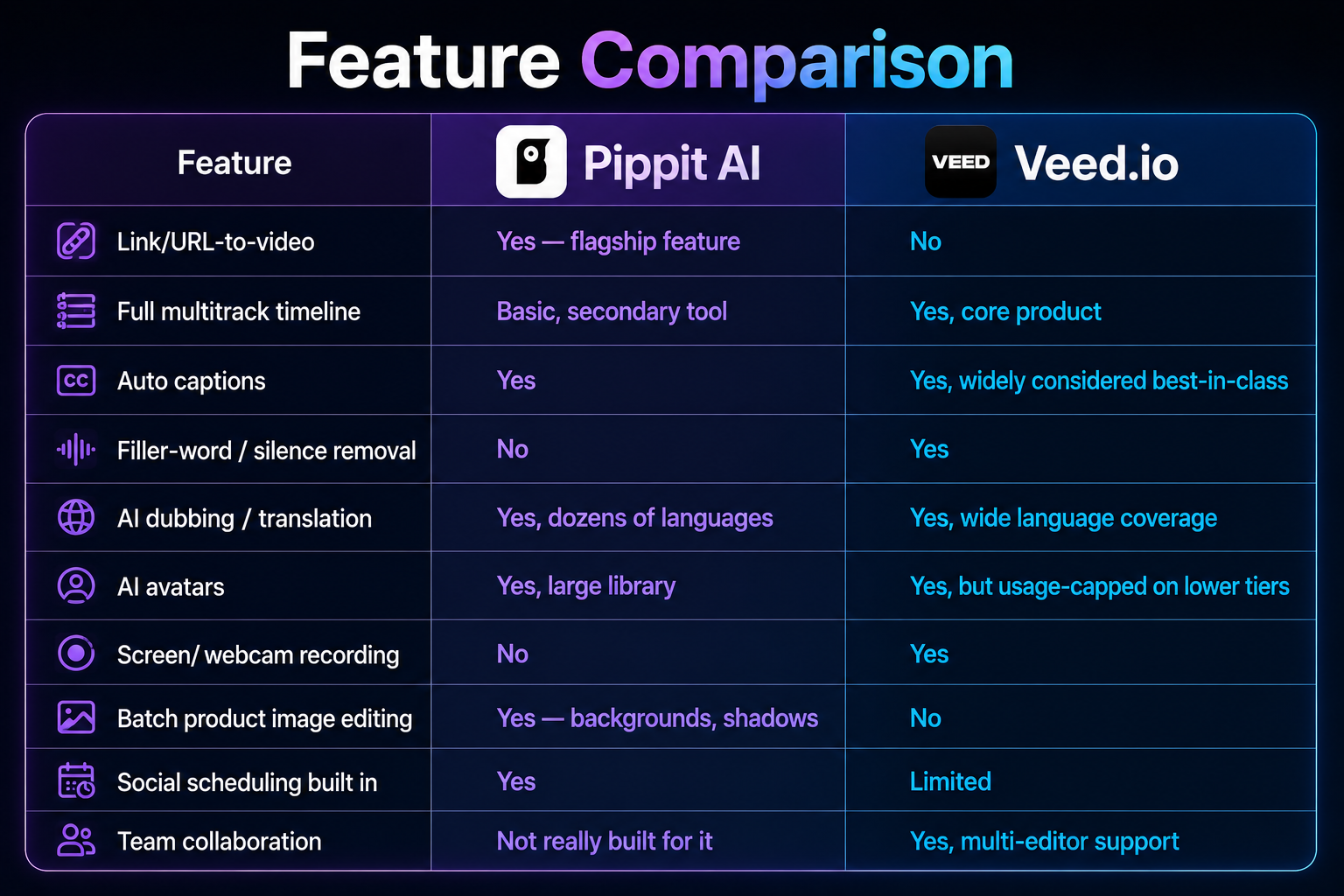
| Feature | Pippit AI | Veed.io |
|---|---|---|
| Link/URL-to-video | Yes — flagship feature | No |
| Full multitrack timeline | Basic, secondary tool | Yes, core product |
| Auto captions | Yes | Yes, widely considered best-in-class |
| Filler-word / silence removal | No | Yes |
| AI dubbing / translation | Yes, dozens of languages | Yes, wide language coverage |
| AI avatars | Yes, large library | Yes, but usage-capped on lower tiers |
| Screen/webcam recording | No | Yes |
| Batch product image editing | Yes — backgrounds, shadows | No |
| Social scheduling built in | Yes | Limited |
| Team collaboration | Not really built for it | Yes, multi-editor support |
Pricing at a Glance
Pippit charges through a credit pool that both video and image generation draw from. Its free plan renews weekly, and its main paid tier runs in the neighborhood of $24/month billed annually — enough for meaningful monthly output for a solo seller.

Veed charges per seat, with AI features governed by separate yearly allowances layered on top. Its cheapest paid plan starts lower, around $12/month per user, but the features people actually want — avatars, translation, higher-resolution export — sit on its pricier tier, and costs multiply fast for teams since it’s billed per person.
Neither pricing model is better on paper; they just fail differently. Pippit users can burn through weekly credits on generations that don’t turn out right. Veed users can burn through annual AI-minute allowances faster than expected if avatars or dubbing become a regular habit.
Reputation Check
Veed has been around long enough to build a large, largely positive review base across major platforms, with people consistently praising how fast and accurate its captioning is. The most common complaints are about the free plan’s watermark and pricing creep as you move into AI-heavy tiers.
Pippit is newer under its current name, so its independent review footprint is thinner. Hands-on write-ups tend to be positive about speed and value, but a chunk of early user feedback flags customer-support response times and confusion around how credits get spent. Worth factoring in if reliable support matters to your workflow.
Who Should Actually Use Which
Pick Pippit AI if you’re
- Selling products online and need frequent marketing clips without hiring an editor
- Comfortable letting AI write the first draft of a script
- Working solo and prioritizing speed over granular control
Pick Veed.io if you’re
- Editing real recorded footage — interviews, webinars, tutorials, talking-head content
- Relying on accurate captions or multi-language subtitles regularly
- Working with a team that needs shared projects and review workflows
Final Take
After a week with both, my honest read is that this isn’t really a rivalry — it’s a mismatch of use cases dressed up as a comparison. Pippit is the faster path from “I have a product” to “I have a video.” Veed is the better path from “I have footage” to “I have a polished, captioned, shareable video.” If your work lives mostly in one of those two lanes, the choice mostly makes itself. If you genuinely need both — generation and heavyweight editing — expect to keep two subscriptions rather than finding one tool that does both well.
Pricing, features, and review trends checked mid-2026; both platforms update plans fairly often, so confirm current details on pippit.ai and veed.io before subscribing.