
Cutout.Pro Review 2026: Features, Pricing, Pros & Cons — Is It Still Worth It?
If you’ve landed here searching for an honest Cutout.Pro review in 2026, you’re in the right place. This guide covers everything — from what the platform actually does well, to its pricing structure, who it works best for, and some serious concerns every potential user should know before signing up.
We’ll walk through the features, break down the credit and subscription pricing in plain language, share real user experiences, and compare it to leading alternatives — so you can make a fully informed decision.
What Is Cutout.Pro?
Cutout.Pro is an AI-powered visual content platform launched in 2020, operated by LibAI Tech Limited, a Hong Kong-based company. It offers a wide range of automated image and video editing tools, primarily marketed to e-commerce sellers, content creators, marketers, and anyone who needs fast, professional-looking visuals without requiring design experience.
The platform is available as both a web-based tool (browser, no install needed) and a Windows desktop application. It runs on a hybrid credit-and-subscription pricing model, which we’ll unpack in detail below.
In short: Cutout.Pro is a genuinely capable set of AI tools — but 2026 has brought some significant questions about safety, reliability, and value that deserve your attention before you commit.
Also Read : Shared Hosting vs. VPS Hosting: What’s the Real Difference?
Key Features of Cutout.Pro
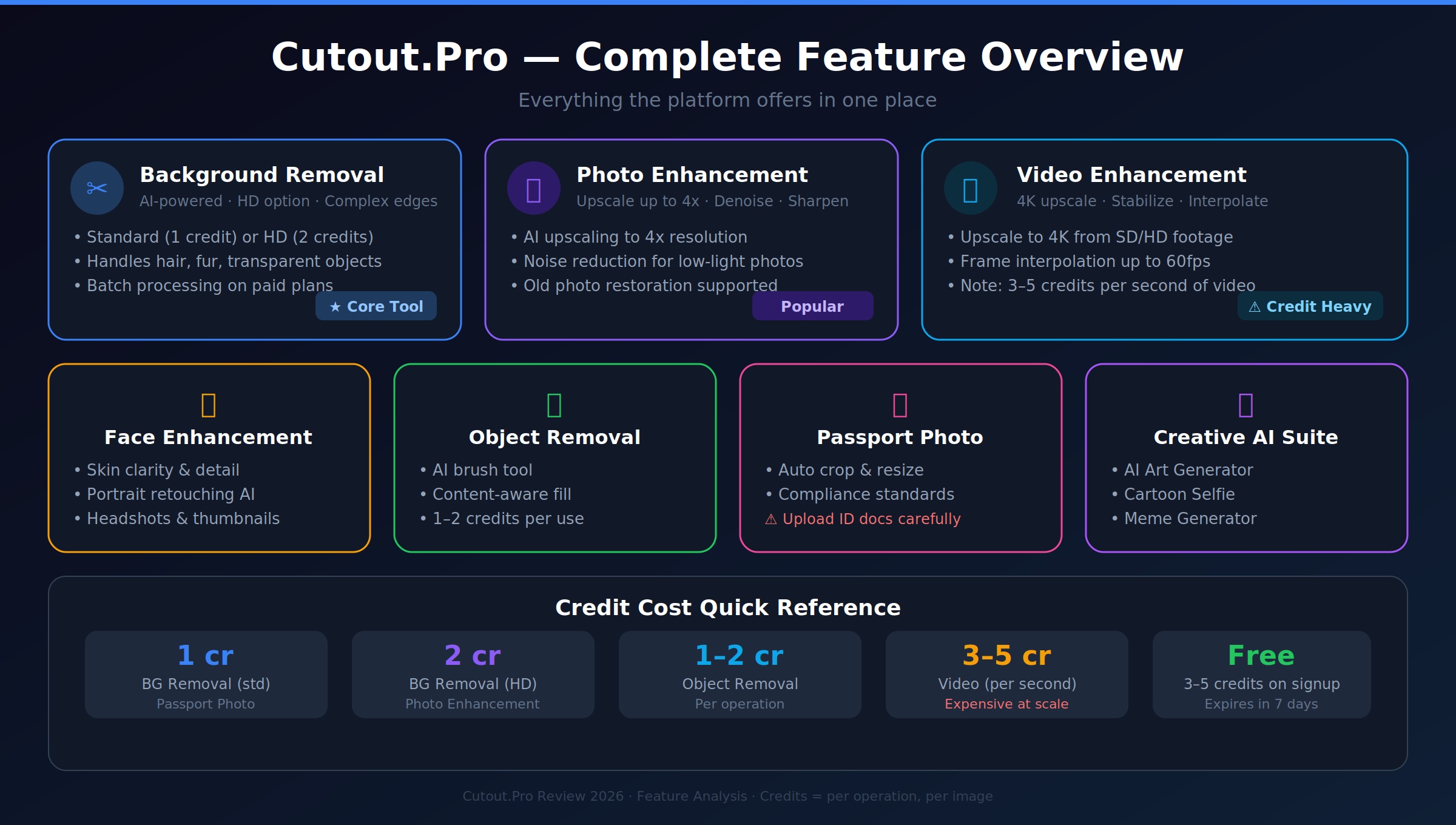
1. Background Removal
This is the tool that made Cutout.Pro’s reputation. The AI automatically detects and separates subjects from backgrounds in photos, including complex edges like hair, fur, and transparent objects. Both standard and HD-quality outputs are supported.
2. Photo Enhancement & Upscaling
The photo enhancer uses AI to increase image resolution by up to 4x, sharpen details, reduce blur, and restore old or low-quality photos. Particularly useful for eCommerce product shots and portrait retouching.
3. Video Enhancement & Upscaling
Cutout.Pro extends its AI into video territory, offering:
- 4K upscaling from lower-resolution footage
- Noise reduction for grainy or poorly-lit clips
- Motion stabilization for shaky handheld footage
- Frame interpolation to boost frame rates up to 60fps
- Deinterlacing for legacy video formats
4. Face Enhancement
A dedicated portrait AI that improves skin clarity, sharpens facial features, and reduces common issues like red-eye or under-eye shadows. Popular for headshots, dating profile photos, and content creator thumbnails.
5. Object Removal
The AI brush tool lets users paint over unwanted objects in a photo — watermarks, blemishes, stray items in product shots — and the background fills in automatically using surrounding context.
6. Passport Photo Maker
An automated tool for generating compliant passport and ID photos. Users upload a selfie and the tool crops, resizes, and adjusts the background to meet official specifications.
7. Creative AI Tools
Beyond editing, Cutout.Pro also includes:
- AI Art Generator — converts photos into artistic styles
- Cartoon Selfie — turns portraits into illustrated characters
- Photo Animator — adds subtle motion effects to still images
- Meme Generator — quick creation tool for social media content
- Background Diffusion — AI-generated scene backgrounds
Also Read : Jilo Viral: What It Is, How It Works & Why It’s Risky
Performance: What It Does Well and Where It Falls Short
Strengths
Facial and subject clarity. Cutout.Pro’s AI consistently does a solid job on portraits. Skin details, facial definition, and subject sharpness all see genuine improvement, especially at lower input resolutions.
Ease of use. There’s no learning curve. You upload, it processes, you download. For non-technical users — small business owners, solopreneurs, casual creators — this is a real advantage.
Batch processing. Paid plans allow multiple files to be processed at the same time, which is a time-saver for anyone dealing with large product catalogs or event photo sets.
Browser-based flexibility. The web version works on any device without installation, making it practical for Mac, tablet, or Chromebook users who can’t use the desktop app.
Weaknesses
Background quality issues. When upscaling videos or enhancing photos, the AI tends to over-smooth backgrounds, creating an artificial, “painted” look behind the subject.
Texture loss. Fine details — fabric weave, hair strands, natural skin texture — often disappear during enhancement and get replaced with smooth, AI-averaged surfaces.
Edge artifacts. The boundary between subject and background can look unnatural, particularly around hair or fine-detailed objects where halos or jagged outlines appear.
“Plastic” portrait effect. Portrait enhancement frequently over-processes faces, producing a waxy, synthetic skin appearance rather than a genuinely improved photo.
Video is expensive relative to quality. Video processing consumes 3–5 credits per second of footage, making even a 30-second clip surprisingly costly — often more than dedicated video tools.
Also Read : WCO Anime Review 2026: Pros, Cons, and Alternatives
Cutout.Pro Pricing 2026: The Full Breakdown
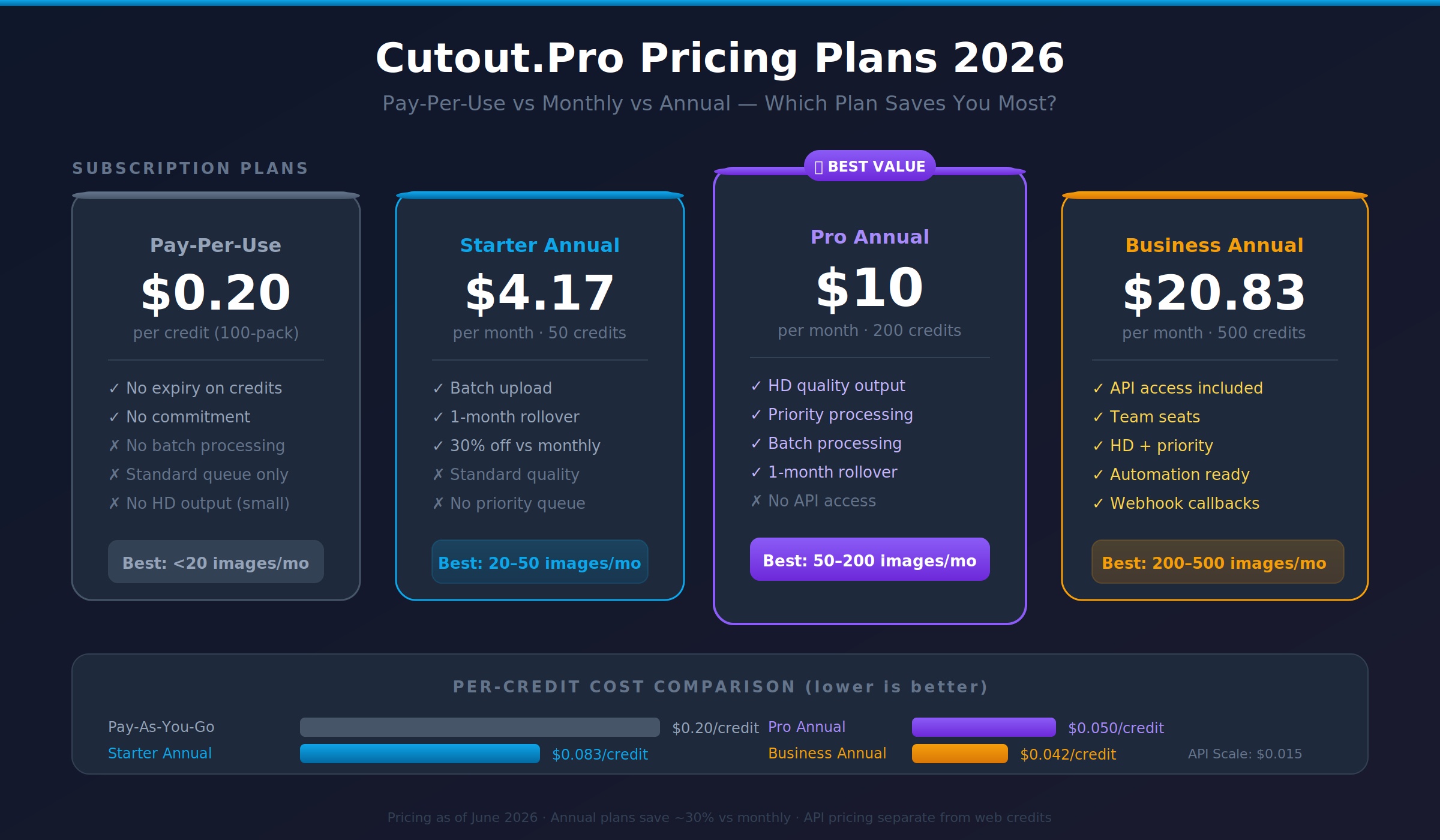
Cutout.Pro uses a hybrid pricing system combining pay-per-use credits and monthly/annual subscriptions. Getting the math right matters — the wrong plan can mean significantly overpaying.
How Credits Work
Every action on Cutout.Pro costs credits. The number depends on what you’re doing:
| Operation | Credits Used |
|---|---|
| Background removal (standard) | 1 credit |
| Background removal (HD) | 2 credits |
| Object removal | 1–2 credits |
| Photo enhancement/upscale | 1–2 credits |
| Passport photo | 1 credit |
| Video background removal | 3–5 credits per second |
Important: Credits are consumed per operation, per image. If you remove a background AND enhance the same photo, that’s 2–4 credits for one image. Batch processing applies the same per-image rate.
New users get 3–5 free credits on signup, valid for 7 days.
Option A: Pay-Per-Use Credit Packs (No Subscription)
Credits don’t expire, making this ideal for irregular use.
| Pack Size | Price | Cost Per Credit |
|---|---|---|
| 10 credits | $3.99 | $0.40 |
| 40 credits | $9.99 | $0.25 |
| 100 credits | $19.99 | $0.20 |
| 200 credits | $34.99 | $0.17 |
No batch processing access via web dashboard on the smallest pack. Standard queue priority only.
Option B: Monthly Subscription Plans
For users with consistent monthly volume. Unused credits roll over for one month only.
| Plan | Monthly Price | Credits/Month | Per-Credit Cost | Highlights |
|---|---|---|---|---|
| Starter | $5.99 | 50 | $0.12 | Batch upload, standard quality |
| Pro | $14.99 | 200 | $0.075 | HD quality, priority queue |
| Business | $29.99 | 500 | $0.06 | API access, team seats |
| Enterprise | Custom | Custom | Custom | Dedicated support, SLA |
Option C: Annual Subscription Plans (Save ~30%)
| Plan | Annual Price | Monthly Equivalent | Credits/Month | Per-Credit Cost |
|---|---|---|---|---|
| Starter Annual | $49.99/yr | $4.17/mo | 50 | $0.083 |
| Pro Annual | $119.99/yr | $10.00/mo | 200 | $0.05 |
| Business Annual | $249.99/yr | $20.83/mo | 500 | $0.042 |
Option D: API Pricing (For Developers & Automated Workflows)
API pricing is completely separate from web dashboard credits.
| API Tier | Monthly Price | API Calls/Month | Per-Call Cost | Concurrent Requests |
|---|---|---|---|---|
| Developer | $19.99 | 500 | $0.04 | 10 |
| Growth | $49.99 | 2,000 | $0.025 | 25 |
| Scale | $149.99 | 10,000 | $0.015 | 50 |
| Enterprise | Custom | Custom | Custom | 100+ |
Includes webhook callbacks, Python/Node.js/PHP SDKs, and full alpha channel output.
Video-Specific Pricing (Online Version)
For video enhancement specifically, Cutout.Pro sells time-based credit packs:
| Video Duration | Price | Approx. Cost Per Minute |
|---|---|---|
| 1 minute | $19 | $19.00 |
| 3 minutes | $29 | $9.67 |
| 5 minutes | $45 | $9.00 |
| 15 minutes | $129 | $8.60 |
| 45 minutes | $299 | $6.64 |
| 120 minutes | $599 | $4.99 |
Desktop app (Windows only): $39/month, $129/year, or $169 lifetime.
Which Plan Is Right for You?
| Monthly Volume | Recommended Plan | Estimated Monthly Cost |
|---|---|---|
| Under 20 images | Pay-Per-Use (40 credits) | ~$9.99 |
| 20–50 images | Starter Annual | ~$4.17 |
| 50–200 images | Pro Annual | ~$10.00 |
| 200–500 images | Business Annual | ~$20.83 |
| 500–2,000 images | API Growth | ~$49.99 |
| 2,000–10,000 images | API Scale | ~$149.99 |
Who Should Use Cutout. Pro?
eCommerce Sellers
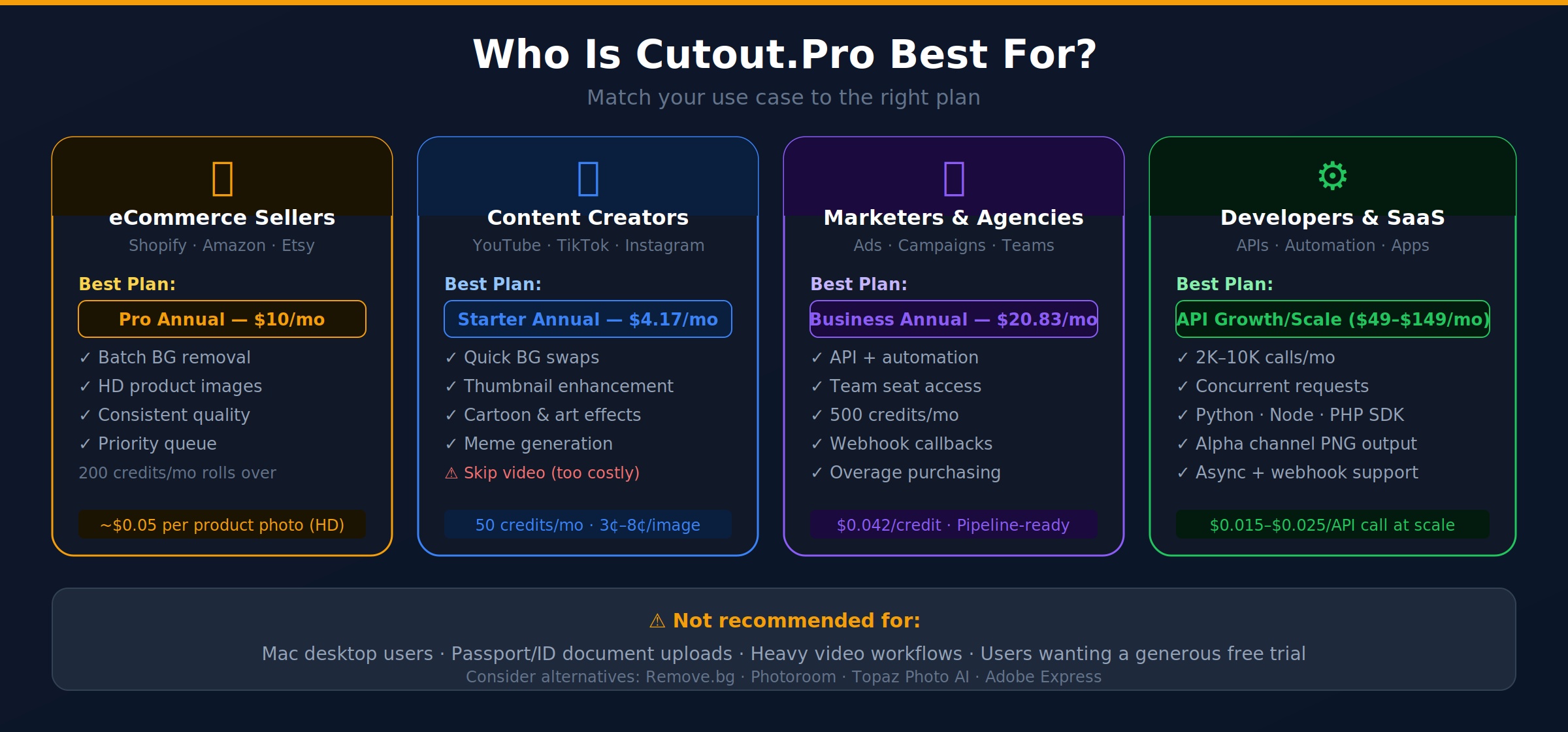
For Shopify, Amazon, or Etsy sellers who need consistent, clean product images with white or transparent backgrounds, Cutout.Pro’s batch background removal is a practical option. The Starter or Pro Annual plans offer a cost-effective per-image rate. That said, if your product catalog is large and you need API integration, evaluate the Business plan carefully.
Content Creators & Social Media Managers
Creators who need quick background swaps, thumbnail enhancement, or artistic filter effects will find Cutout.Pro’s web tool fast and convenient. The creative AI suite — cartoonizing, animating, meme generation — adds extra value for social content. Just factor in that HD output costs double the credits.
Marketers & Ad Agencies
For teams producing high-volume visual assets, the Business subscription’s team seats and API access make it the most practical tier. The ability to plug Cutout.Pro’s background removal into existing automation pipelines is a real workflow advantage.
Photographers & Studios
Photography studios processing hundreds of images monthly may find the Business Annual plan ($20.83/month for 500 credits) cost-effective for consistent batch jobs. However, the “plastic skin” issue in portrait enhancement means you’ll likely still want manual retouching on final deliverables.
Developers & SaaS Builders
The API tiers are well-structured for programmatic integration, with clear per-call costs, concurrency limits, and SDK support. For e-commerce platforms or apps that need automated image processing, the Growth or Scale API tiers are worth evaluating.
Pros and Cons Summary
Pros
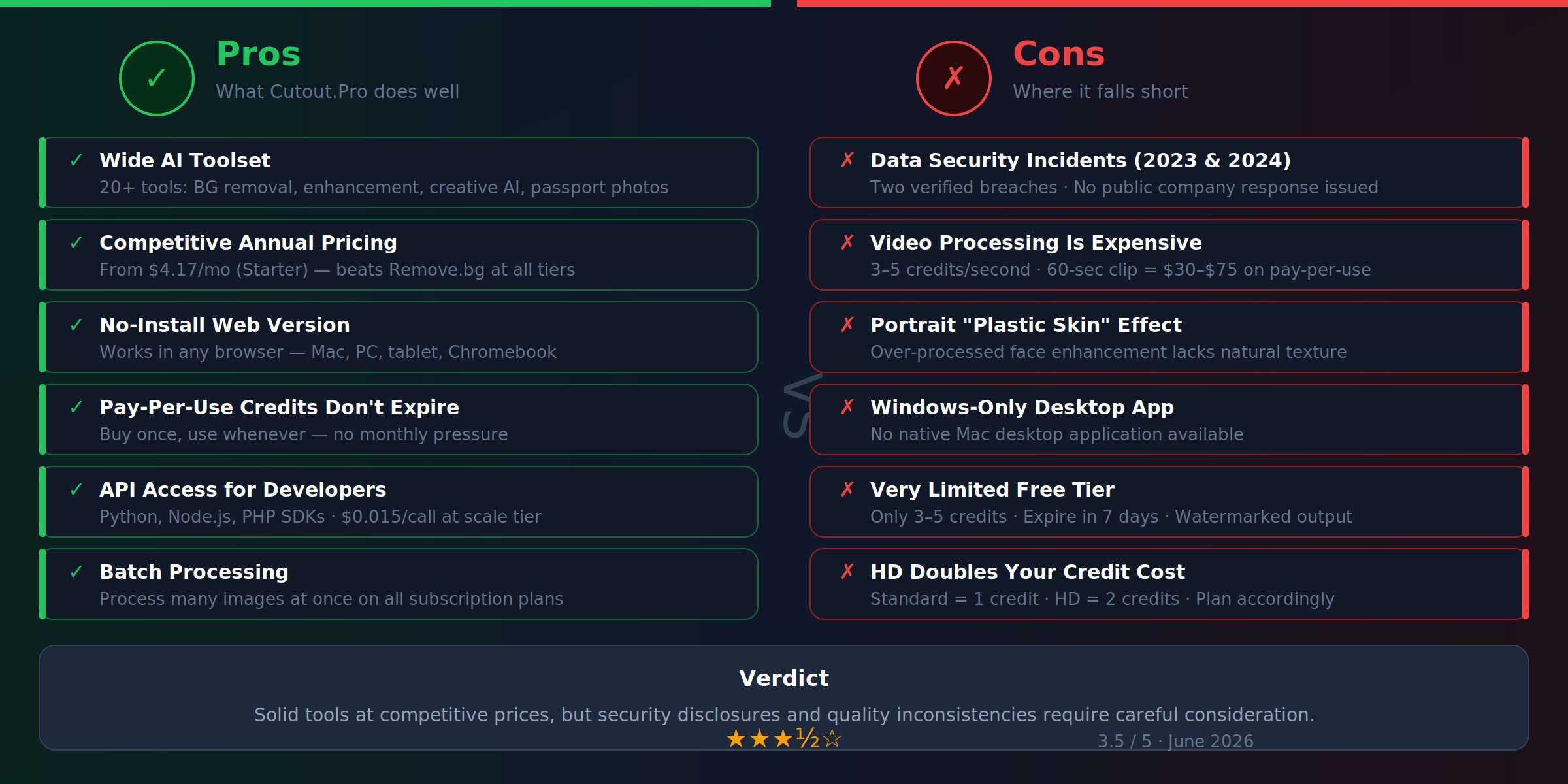
- Wide range of AI tools in one platform
- No installation required for web version
- Competitive subscription pricing, especially annually
- Batch processing on all subscription plans
- API access for automated workflows (Business and above)
- Credits from pay-per-use packs don’t expire
- Beginner-friendly interface with no learning curve
Cons
- Free tier is extremely limited (3–5 credits, 7-day expiry)
- Video processing is expensive relative to quality
- HD output doubles credit costs
- Background over-smoothing and texture loss in enhancement results
- “Plastic” skin effect in portrait enhancement
- Desktop app is Windows-only — no Mac version
- Only supports MP4, MOV, and WebM for video
- 2GB maximum file size for uploads
- Documented data security concerns (see below)
- Customer support response times reported as slow
- Rollover credits expire after one additional month
A Note on Data Security (Important for 2026 Users)
This section exists because any honest review of Cutout.Pro in 2026 has to address it directly.
Two separate data security incidents have been documented and independently verified:
2023 — Elasticsearch Exposure: Security researchers at Cybernews discovered that Cutout.Pro left an Elasticsearch database exposed without authentication, making approximately 9 GB of user data accessible, including email addresses and IP addresses.
February 2024 — Data Breach: A threat actor posted a 5.93 GB dataset containing over 41 million records from Cutout.Pro — reportedly covering around 20 million user accounts — to an underground forum. The exposed data reportedly included email addresses, names, IP addresses, phone numbers, API keys, and hashed passwords. This breach was independently verified by the Have I Been Pwned service and reported by cybersecurity outlet BleepingComputer.
As of the time of writing, Cutout.Pro has not published a public statement or incident response regarding either event.
What this means for you: If you’re uploading personally identifiable images (passport photos, ID documents, personal portraits) or sensitive business assets, this context is worth factoring into your decision. At minimum, use a unique password for any Cutout.Pro account and consider using a virtual card for payment rather than your primary card.
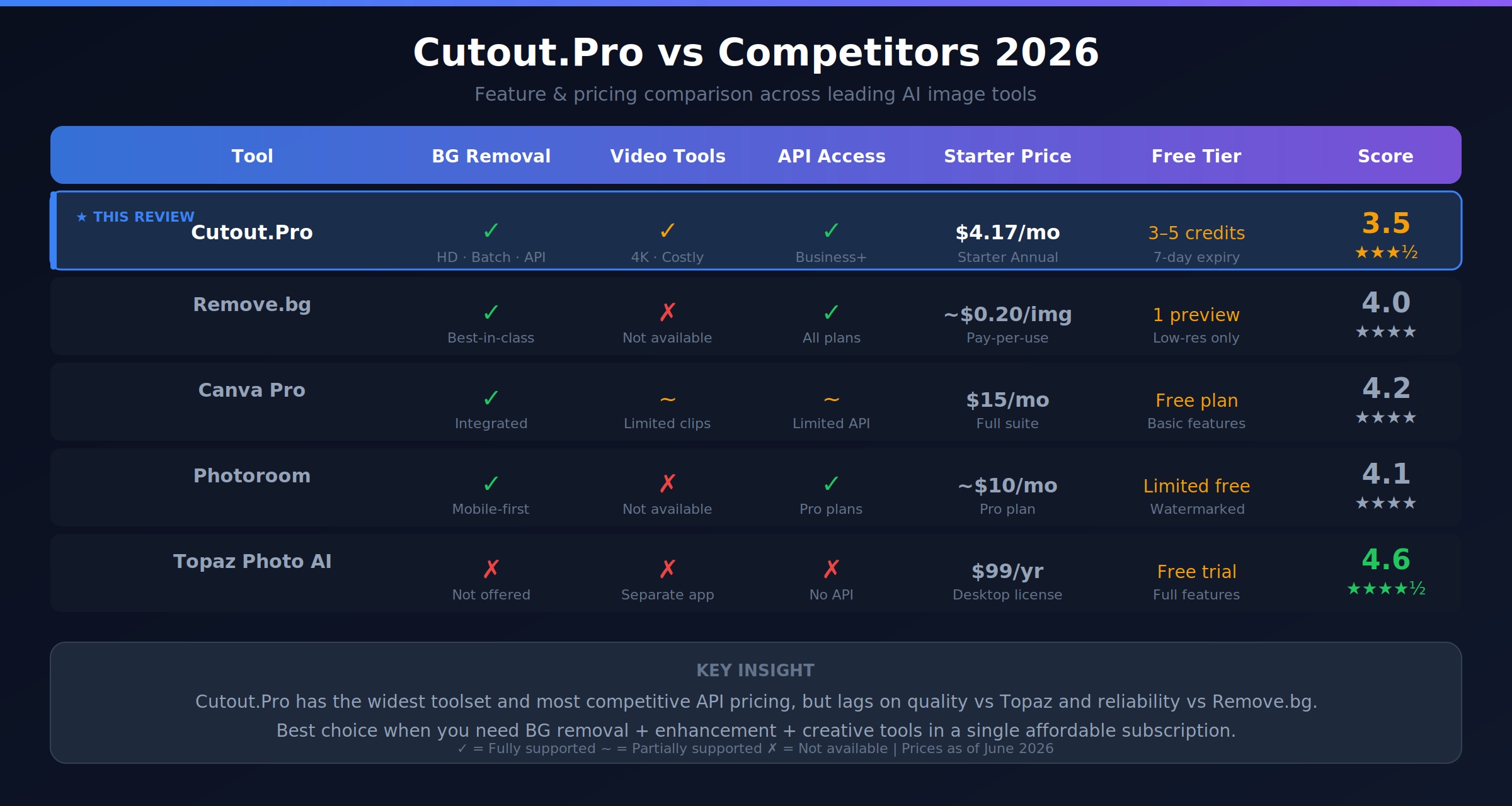
Cutout.Pro vs. Competitors: Comparison Table
| Feature | Cutout.Pro | Remove.bg | Canva Pro | Photoroom |
|---|---|---|---|---|
| Background removal | ✅ | ✅ | ✅ | ✅ |
| Video enhancement | ✅ | ❌ | Limited | ❌ |
| Photo upscaling | ✅ (4x) | ❌ | Limited | ✅ |
| API access | ✅ (Business+) | ✅ | Limited | ✅ |
| Batch processing | ✅ (Paid) | ✅ | ✅ | ✅ |
| Per-image cost (starter) | ~$0.12 | ~$0.20 | ~$0.05 (amortized) | ~$0.07 |
| Per-image cost (API, high-vol) | ~$0.015 | ~$0.07 | N/A | Varies |
| Mac desktop app | ❌ | ❌ | ✅ | ✅ |
| Free tier | 3–5 credits | 1 preview | Limited | Limited |
| Creative AI tools | ✅ (many) | ❌ | ✅ | Limited |
Pricing context: Cutout.Pro is priced below Remove.bg at every tier and competitive with Photoroom at scale. Canva Pro’s per-image cost is lower if you’re already paying for the suite, but Canva’s API is limited and not suitable for programmatic pipelines.
Tips for Getting the Most Value from Cutout.Pro
- Don’t default to HD if you don’t need it. Web and social media use rarely requires HD quality. Standard output cuts your credit cost in half.
- Test before you batch. Run 5–10 representative images through before committing a full batch — especially if image content varies significantly.
- Track your actual monthly usage before choosing a plan. Many users overestimate their needs and end up on a plan with credits they never use.
- Use rollover strategically. If you know a big project is coming next month, deliberately underuse this month to bank rollover credits.
- For API users, combine standard and HD selectively. Not every image in a catalog needs HD processing. Use standard for web thumbnails and HD only for hero or main product images.
- Video? Factor in the per-second cost before uploading. A 2-minute video at 4 credits/second costs 480 credits — that’s potentially $120+ on pay-per-use. Dedicated video tools may be more economical for heavy video workflows.
Alternatives Worth Considering
Remove.bg — The simplest background removal tool on the market. Excellent API, clean output, but limited to background removal only. No video, no enhancement suite.
Photoroom — Strong background removal and product photo editor with a well-designed mobile app. A better choice for mobile-first workflows.
Canva Pro — If you’re already in the Canva ecosystem for design work, the integrated background removal and Magic Edit features may be enough for most needs at no extra cost.
Adobe Firefly / Express — For teams already invested in Adobe’s ecosystem, Express offers solid background removal and enhancement within a familiar interface.
Topaz Photo AI / Gigapixel — For serious photo upscaling and enhancement quality, Topaz’s dedicated AI tools produce significantly better results than Cutout.Pro, particularly for professional photographers. One-time purchase available.
Frequently Asked Questions
Is Cutout.Pro free? There’s a free tier with 3–5 credits on signup (valid 7 days). Beyond that, free previews are available with watermarks, and video previews are limited to 3 seconds. Full functionality requires paid credits or a subscription.
Is Cutout.Pro safe to use? Cutout.Pro experienced documented data exposures in 2023 and 2024, the latter involving a reported 41 million records. As of mid-2026, no public incident response has been issued by the company. For general editing of non-sensitive images, this may not be a deal-breaker for all users. For passport photos, ID documents, or sensitive business assets, it’s a meaningful risk factor to weigh.
Can I use Cutout.Pro on a Mac? The web version works on any browser, including Mac. The desktop application, however, is Windows-only. Mac users must rely on the browser interface.
Do unused credits expire? Pay-per-use credit packs don’t expire. Subscription plan credits roll over for one month, then expire.
Which Cutout.Pro plan is the best value? For most regular users, the Pro Annual plan ($10/month, 200 credits) offers the best balance of per-image cost, HD quality, and priority processing. For occasional users, the 40-credit pay-per-use pack ($9.99, no expiry) is smarter than paying for a subscription you won’t fill.
How many credits does background removal use? Standard quality: 1 credit per image. HD quality: 2 credits per image. Video background removal: 3–5 credits per second of footage.
Can Cutout.Pro be integrated via API? Yes. API access is included in the Business subscription and all dedicated API tiers (Developer, Growth, Scale, Enterprise). SDKs are available for Python, Node.js, and PHP.
What formats does Cutout.Pro support? For video: MP4, MOV, and WebM. For images: JPG, PNG, and WebP are the primary formats. The 2GB file size cap applies to all uploads.
Is there a refund policy? Cutout.Pro states a refund policy, but user reports suggest support response times can be slow and refund processing inconsistent. Use a payment method that allows chargebacks as a practical precaution.
Which country is Cutout.Pro from? Cutout.Pro is operated by LibAI Tech Limited, incorporated in Hong Kong. The service is used globally and the platform is in English.
Final Verdict
Cutout.Pro in 2026 is a capable but complicated choice.
On the tool side, the background removal is genuinely good, the breadth of AI features is impressive for the price, and the subscription plans — especially annually — are competitive against direct alternatives like Remove.bg. For eCommerce sellers and content creators doing moderate-volume image processing, it can be a cost-effective workflow addition.
The pricing system, however, requires careful planning. HD operations, multi-step workflows, and video processing all cost significantly more than a surface-level reading of the credit prices suggests. The decision framework in this article should help you right-size your plan.
The data security situation is a real consideration. Whether it’s a dealbreaker depends on your personal risk threshold and the sensitivity of what you’re uploading. For low-stakes images, the risk profile looks different than it does for passport photos or proprietary business assets.
Who should use Cutout.Pro:
- eCommerce sellers needing batch background removal at a competitive per-image cost
- Creators who want a single platform for multiple quick AI edits
- Developers looking for API access at a lower price point than Remove.bg
Who should look elsewhere:
- Anyone uploading sensitive identity documents or proprietary assets
- Mac users needing a desktop application
- Users with heavy video processing needs (cost-per-minute adds up fast)
- Photographers requiring professional-grade portrait retouching quality
Overall rating: 3.5 / 5 — Useful tools at reasonable subscription prices, tempered by quality inconsistencies, a limited free tier, and important data security questions that remain unresolved as of mid-2026.