
Remaker AI vs Pica AI: Which Face Swap & AI Photo Editor Wins in 2026?
AI face swapping has moved well past the novelty stage. In 2026, creators, marketers, online sellers, and everyday users rely on tools like Remaker AI and Pica AI to swap faces, generate portraits, retouch product shots, and produce social-ready visuals in seconds. But which one actually deserves your money and your time?
This guide breaks down both platforms from every angle that matters — features, pricing and credit systems, output quality, speed, privacy, and real-world use cases — so you can pick the right tool without wasting your free credits on guesswork.
Quick Snapshot: Remaker AI vs Pica AI
| Category | Remaker AI | Pica AI |
|---|---|---|
| Core focus | All-in-one AI creative suite (face swap, upscaling, background removal, AI portraits, video tools) | Face swap specialist with photo enhancement add-ons |
| Pricing model | Pay-as-you-go credits, no subscription required | Freemium with monthly/quarterly/yearly subscriptions plus credit packs |
| Free tier | 30 credits on signup + 5 daily credits | Around 4-5 credits daily |
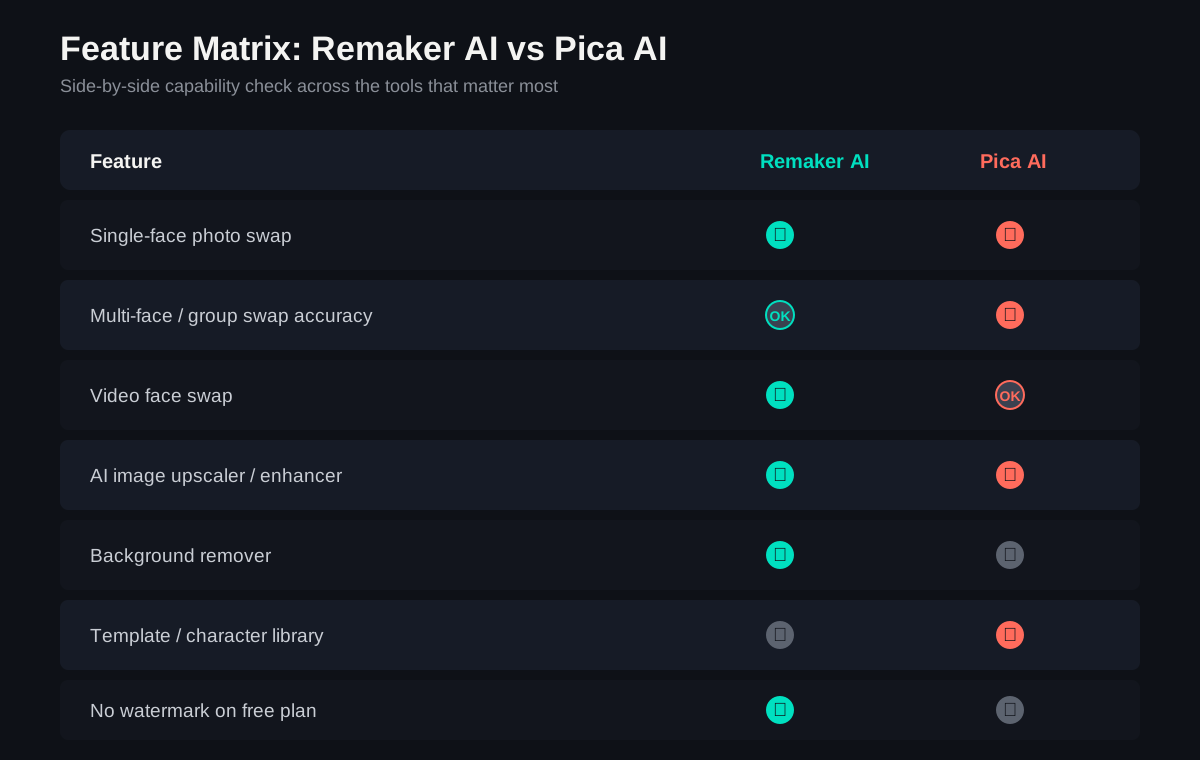
| Watermarks on free plan | None | Yes, removed only on paid plans |
| Platforms | Web, iOS, Android, Windows, Mac (browser-based) | Web, iOS, Android |
| Multi-face / group swaps | Supported | Strong — considered one of its standout strengths |
| Video face swap | Available, credit-heavy | Limited compared to dedicated video tools |
| Commercial usage rights | Included on most paid credit packs | Tied to top-tier subscription only |
| Best for | Mixed-use creators who want one dashboard for everything | Users who want polished, detail-focused single-purpose face swaps |
Global Market Outlook: AI Face Swap & Photo Editing in 2026
The AI image-editing space has grown dramatically. Industry trackers estimate that users now generate tens of millions of AI images every day worldwide, with billions of synthetic images produced since consumer AI generators went mainstream a few years ago. This explosive growth has fueled demand for face-swap and photo-enhancement tools across regions — from North America and Europe, where marketing and content-creation use cases dominate, to Asia-Pacific markets, where social and entertainment use cases (memes, fun filters, short-video content) drive much of the daily usage.
At the same time, regulators and platforms worldwide are paying closer attention to AI-generated and AI-edited imagery. Several markets now expect clearer labeling of AI-altered content, and major social platforms have begun rolling out “AI-generated” tags. For Remaker AI and Pica AI users — particularly marketers and businesses — this means staying aware of local disclosure rules when publishing face-swapped or AI-enhanced content commercially.
On the privacy side, both platforms claim to delete uploaded images after a limited window (commonly within 24-48 hours), which aligns with broader industry moves toward “process and delete” data handling as consumer trust in AI image tools becomes a competitive differentiator.
What Is Remaker AI?
Remaker AI is best described as a Canva-style dashboard where every tile launches an AI model instead of a design template. Instead of juggling five different apps for face swapping, upscaling, background removal, AI headshots, and meme creation, Remaker AI puts all of it behind one login and one credit balance.
The platform’s tagline promises “the easiest way to recreate any image,” and in practice that means a left-hand toolbar packed with options: face swap for photos and videos, AI image generator, photo enhancer/upscaler, background remover, AI portrait and ID photo generator, sticker maker, and more. Everything runs in the browser, with companion apps for iOS and Android.
Key Features of Remaker AI
- Photo & video face swap with support for multiple faces in a single frame
- AI image upscaler that can push low-resolution images to HD without heavy distortion
- Background remover for product shots and portraits
- AI portrait, avatar, and ID photo generator for professional headshots or document photos
- Meme and sticker creation tools for quick social content
- Multi-language interface, which makes it easier for distributed teams to use the same workflow
What Is Pica AI?
Pica AI built its reputation primarily as a face-swap and photo enhancement app, with a strong emphasis on realism and natural blending. The platform leans heavily into a library of pre-made templates — think historical figures, celebrity selfies, retro yearbook photos, and meme formats — that users can drop their own face into.
Where Pica AI tends to shine is group photo face swaps. Many reviewers note that its face detection handles multiple people in a single image more accurately than most competitors, correctly isolating each face so you can swap them independently rather than dealing with a blurred or merged result.
Key Features of Pica AI
- Single and multi-face swaps for photos, videos, and GIFs
- Large template library including celebrities, fictional characters, and themed photo styles
- Photo enhancement tools for sharpening and upscaling images
- Cross-platform apps on web, iOS, and Android with Google, Facebook, and Apple ID login
- Privacy controls that let users delete generated content from their account
Pricing & Credit System Compared (2026)
Pricing is often where the real difference between these two tools shows up — and it’s worth reading the fine print before committing.
Remaker AI Pricing
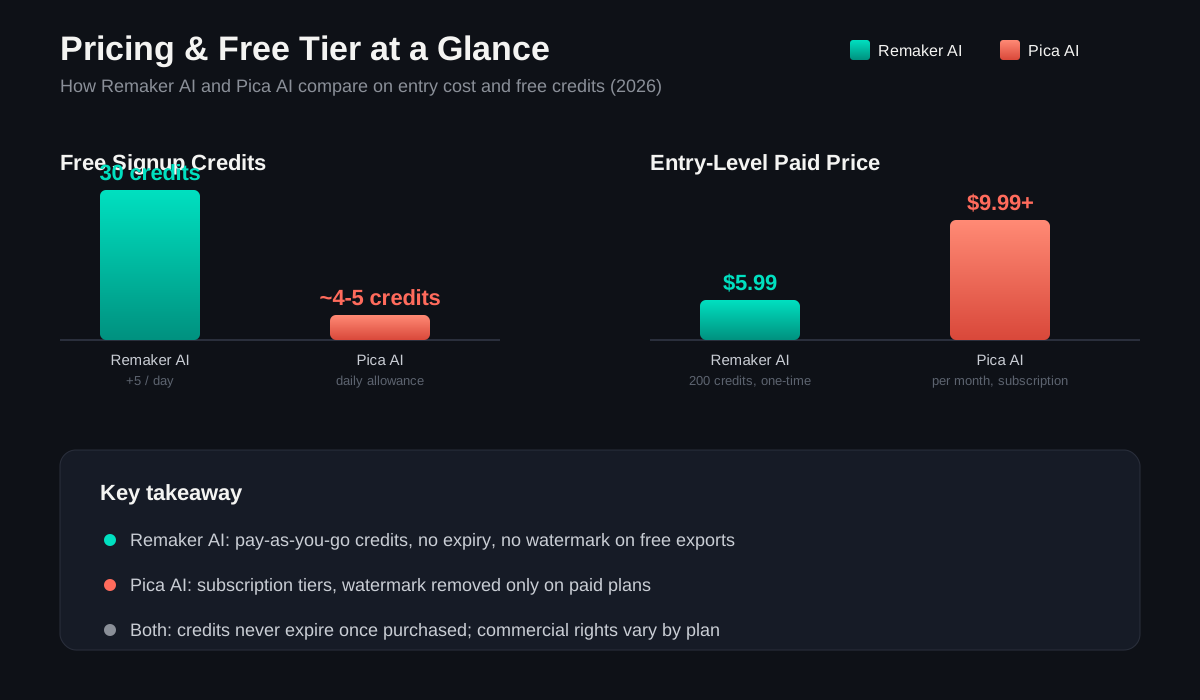
Remaker AI runs on a pay-as-you-go credit model with no mandatory subscription. New accounts receive 30 free credits at signup, plus a small daily top-up (around 5 credits per day) just for logging in. Most simple actions — like a single-photo face swap — cost around 1-2 credits, while heavier jobs such as enhancing a video can burn through 50-100+ credits depending on length and resolution.
Paid credit packs generally start around $5.99 for 200 credits and scale up to larger bundles (roughly $299 for 20,000 credits at the top end), with mid-tier monthly options also available for users who prefer recurring billing. Credits do not expire once purchased, so occasional users can top up once and return months later without losing value.
A few things to watch:
- Mobile app purchases can cost noticeably more than the same credit pack bought through the website.
- Although marketed as “no subscription required,” some auto-renewing plans do exist — check the billing terms before you check out.
- The credit-per-task cost varies a lot by feature, which makes high-volume video work harder to budget for precisely.
Pica AI Pricing
Pica AI follows a more traditional freemium-plus-subscription structure. The free tier gives users a handful of daily credits (commonly cited around 4-5), enough for a couple of basic swaps — single-face swaps typically cost 1 credit, while multi-face swaps cost more.
Paid plans are offered on monthly, quarterly, and yearly billing cycles, with pricing commonly seen in the $9.99-$39.99 per month range depending on the tier, plus higher “Advance” and “Enterprise” tiers for teams that need more volume and commercial usage rights. Pica AI also sells one-time credit/add-on packs for users who don’t want a recurring charge.
Important pricing notes for Pica AI:
- Free-tier outputs typically include a watermark, which is removed only on paid plans.
- Commercial usage rights are generally reserved for the highest subscription tier, so businesses planning to use outputs in ads should budget accordingly.
- Annual billing usually offers a meaningful discount compared to paying monthly.
Pricing Verdict
If you’re a casual or occasional user who hates subscriptions, Remaker AI’s pay-once, use-anytime credits are easier on the wallet and the inbox (no surprise renewals). If you’re a heavy user who wants predictable monthly costs and is fine with a subscription, Pica AI’s tiered plans can work out cheaper per swap — as long as you’re on a paid tier that removes watermarks and unlocks commercial rights.
Performance & Output Quality
Both tools use a similar underlying approach: a face-detection model identifies facial landmarks (eyes, nose, jawline, expression), and a generative model blends the new face onto the target while trying to preserve lighting, skin tone, and angle.
Remaker AI generally performs well on single-face swaps and portrait-style images, producing clean results with minimal “cut-and-paste” artifacts in good lighting. Some testers note that complex group photos or unusual lighting can still occasionally produce minor distortions around edges or hairlines.
Pica AI tends to edge ahead specifically on multi-person images, where its face detection more reliably isolates each individual for independent swapping. For single-face swaps, however, some reviewers find Remaker AI’s results slightly more polished out of the box.
On speed, both platforms typically process a standard photo swap in well under a minute, though video face swaps on either platform can take significantly longer depending on length and resolution — and will consume a proportionally larger number of credits.
Pros and Cons
Remaker AI — Pros
- One dashboard for face swap, upscaling, background removal, portraits, and more
- No mandatory subscription; credits never expire
- No watermarks, even on free exports
- Generous daily free credits for casual testing
- Multi-language interface suited to global teams
Remaker AI — Cons
- Credit costs for video tasks can be unpredictable for budgeting
- Mobile app pricing can run higher than the website
- Some auto-renewal subscription options exist despite “no subscription” messaging — read terms carefully
- Group/multi-face accuracy can lag behind specialists in tricky lighting
Pica AI — Pros
- Strong multi-face/group photo detection and swapping
- Large library of ready-made templates for quick, fun content
- Multiple login options (Google, Facebook, Apple ID)
- Privacy controls to delete generated content
Pica AI — Cons
- Free tier is limited (a handful of daily credits) and includes watermarks
- Commercial rights generally locked behind the top subscription tier
- Monthly subscription cost can add up for occasional users
- Single-face swap polish can feel slightly behind Remaker AI in some tests
Who Should Use Which? Use Cases by Audience
For eCommerce Sellers
If you sell on Amazon, Etsy, Shopify, or social marketplaces, your priority is usually product imagery, not face swapping. Here, Remaker AI’s broader toolkit — background remover, image upscaler, and AI portrait tools — can double as a lightweight product photo editor, letting you clean up backgrounds and sharpen low-resolution supplier images without a separate subscription. Pica AI’s enhancement tools can also help with image sharpening, but its core strength (face swapping) is less directly relevant unless you’re creating model-based mockups or marketing creatives that feature people.
Bottom line: Remaker AI’s all-in-one toolkit offers better day-to-day value for product photo cleanup; Pica AI is more useful if your store relies on model/influencer-style images that need face adjustments.
For Content Creators
Creators making memes, reaction content, “what if” videos, or social experiments will likely enjoy Pica AI’s template library — it’s built for fast, fun output without needing source images of celebrities or characters. On the other hand, if you’re a creator who also needs thumbnails, upscaled clips, AI avatars, and quick background edits, Remaker AI’s bundled tools mean fewer app switches and a single credit balance to manage.
Bottom line: Pica AI for quick, template-driven fun content; Remaker AI for creators who want a broader creative toolkit in one place.
For Marketers
Marketing teams care about commercial rights, consistency, and cost predictability. Remaker AI’s credit packs with included commercial usage on most paid tiers make it easier to greenlight a purchase without a long procurement process. Pica AI can still be a fit, but teams should plan to budget for the higher-tier subscription that unlocks commercial rights and removes watermarks — factor that into your cost-per-asset calculations before scaling a campaign.
Bottom line: Check commercial licensing terms on both platforms before using outputs in paid ads — but Remaker AI’s licensing tends to be less tier-restrictive.
For Businesses & Teams
For small businesses or internal teams (HR generating ID-style photos, support teams creating training visuals, etc.), Remaker AI’s multi-language dashboard and one-login model simplifies onboarding across regions. Pica AI’s Enterprise-tier plans exist for larger-scale needs but come at a higher monthly cost. Businesses with heavy group-photo or multi-person editing needs (event photography, team headshot batches) may find Pica AI’s multi-face handling worth the extra cost.
A Note on Responsible Use
Face-swap technology is powerful, but it comes with real responsibility. Never use either tool to create content depicting a real person without their consent, and be cautious about sharing AI-generated content that could be mistaken for real footage — especially anything involving public figures, financial promises, or impersonation. When in doubt, label AI-edited content clearly, particularly in any commercial or public-facing post.
Alternatives Worth Considering
If neither tool fits perfectly, a few other names regularly come up in 2026 comparisons:
- Reface — strong for short-form video face swaps and mobile-first users
- DeepSwap — freemium web and Android app with credit-based upgrades
- AKOOL — adds lip-synced video face swaps and multi-face editing for more polished projects
- FaceApp — broader editing suite beyond just face swapping, useful if you want retouching tools bundled in
- WaveSpeed Face Swapper — a no-signup, free option for quick single swaps without committing to an account
Frequently Asked Questions
Is Remaker AI better than Pica AI for face swapping? It depends on the type of image. For single-face portrait swaps, Remaker AI often produces slightly cleaner results and doesn’t add watermarks even on the free plan. For group or multi-person photos, Pica AI’s face detection tends to be more reliable.
Which tool is cheaper for occasional use? Remaker AI’s pay-as-you-go credits (which don’t expire) are generally more cost-effective for occasional users, since you’re not paying for a recurring subscription you might forget to cancel.
Does Pica AI have a free plan? Yes, but it’s limited to a small number of daily credits and free-tier outputs typically carry a watermark that’s only removed on paid plans.
Can I use Remaker AI or Pica AI outputs for commercial projects? On Remaker AI, commercial usage is generally included with most paid credit packs. On Pica AI, commercial rights are usually tied to the highest subscription tier — always confirm current terms before using outputs in ads or client work.
Are my photos safe when using these tools? Both platforms state that uploaded images are deleted from their servers within a short window after processing (commonly 24-48 hours), and Pica AI additionally lets users manually delete generated content. As with any AI tool, avoid uploading sensitive personal photos you wouldn’t want processed by a third-party server.
Which tool is better for businesses and marketers? Remaker AI’s broader toolkit (face swap plus upscaling, background removal, and AI portraits) combined with more accessible commercial licensing makes it a practical default for marketing teams. Pica AI can still be worthwhile for campaigns built around group photos or template-driven creative concepts.
Do either of these tools work on mobile? Yes — both Remaker AI and Pica AI offer iOS and Android apps in addition to their web platforms. Note that buying credits through mobile app stores can sometimes cost more than purchasing directly on the website.
Final Verdict
Both Remaker AI and Pica AI are capable, actively maintained tools — but they’re built for slightly different jobs.
Choose Remaker AI if you want a single, no-subscription-required dashboard that covers face swapping plus a wide range of other AI photo and video editing tasks, and you value not having watermarks on free exports.
Choose Pica AI if your priority is face swapping specifically — especially group photos — and you don’t mind a subscription in exchange for a large template library and strong multi-face handling.
For most mixed-use creators, marketers, and small businesses, Remaker AI’s all-in-one approach and flexible credit system offer a slight edge in everyday value. But if your work is heavily centered on group-photo face swaps or template-based content, Pica AI remains a strong, focused choice — just budget for the subscription tier that removes watermarks and unlocks commercial use.
Whichever you choose, start with the free tier first. Both platforms offer enough free credits to test real output quality on your own images before you spend a dollar.