

How to Fix Technical SEO Issues That Prevent Pages From Ranking
You researched your topic, wrote a strong page, and hit publish. A month later, the page is nowhere in the search results. Before you rewrite the content or buy more links, look at the foundation. In many cases, technical SEO issues are quietly preventing search engines from finding, understanding, or trusting your page.
Technical SEO covers the behind-the-scenes health of your website. It determines how easily bots can crawl your pages, whether those pages get stored in the index, and how fast and stable the experience feels to a real visitor. When this layer is weak, great content struggles to perform.
This guide explains how to diagnose the problems, fix them in a sensible order, and stop them from returning. You do not need to be a developer to follow it, though you will probably need one for a few of the fixes.
Why Technical SEO Issues Hold Back Good Content
Search engines work in stages. First they discover and crawl a URL. Then they render and analyze it. Next they decide whether to add it to the index. Only after that does ranking come into play.

A problem at any early stage stops the page from moving forward. A blocked page cannot be crawled. A page with a stray “noindex” tag will not be stored. A page that loads slowly or shifts around while loading may be indexed but pushed below faster competitors. In each case, the quality of your writing never gets a chance to matter.
This is why technical SEO issues are so frustrating. They rarely show up as an obvious error on the page itself. The page looks fine to you, yet search engines see something very different. The cost is also cumulative. A handful of small faults spread across hundreds of URLs can waste crawl resources, split ranking signals, and drag down a whole section of a site.
The good news is that most of these faults follow predictable patterns. Once you know where to look, you can fix a large share of them in a few focused work sessions.
How Search Engines Process Your Pages
A short mental model makes every fix easier to understand.
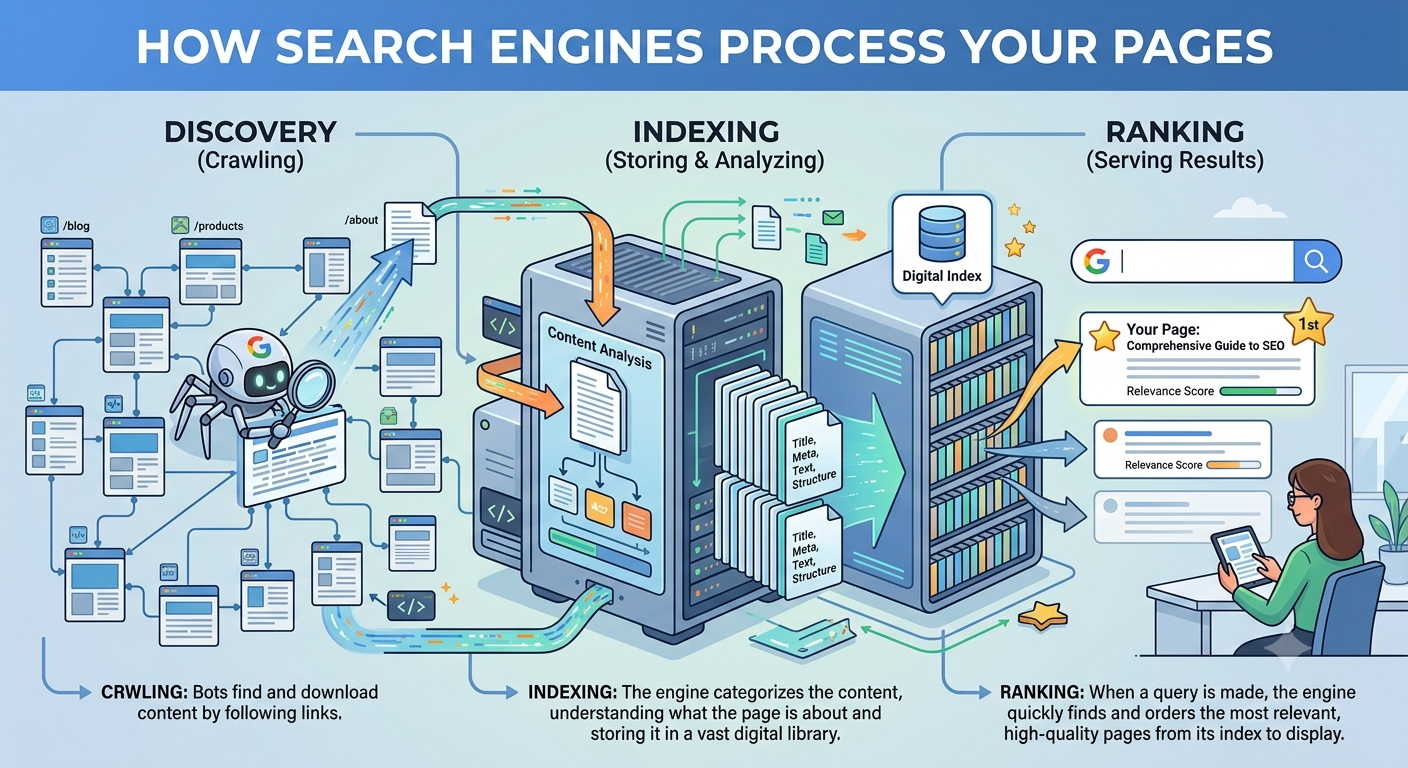
- Crawling: A bot follows links and sitemaps to discover URLs and request them from your server.
- Rendering: The search engine processes the page’s code, including JavaScript, to see what a visitor would see.
- Indexing: The engine decides whether the page is useful and unique enough to store, and picks a canonical version if duplicates exist.
- Ranking: Stored pages are compared against each other for each query, using hundreds of signals including relevance, quality, and page experience.
When you troubleshoot, ask which stage is failing. “Not discovered” and “not indexed” require very different solutions, and mixing them up wastes time.
Step 1: Audit Your Site Before You Fix Anything
Resist the urge to start changing settings immediately. A proper audit tells you what is actually broken and how widespread it is. Gather data from three kinds of tools:
- Google Search Console: This free tool shows indexing status, crawl errors, sitemap processing, mobile usability, and Core Web Vitals directly from Google.
- A website crawler: Tools such as Screaming Frog or Sitebulb crawl your site the way a bot would and flag broken links, redirect chains, missing tags, and duplicate titles.
- PageSpeed Insights or Lighthouse: These report loading speed, responsiveness, and visual stability for individual URLs.
Export everything into one spreadsheet. Group the findings by type and by how many pages each one affects. A single bad template can create thousands of errors, so fixing the template is often worth more than fixing pages one by one. Once the data is organized, you will see clearly which technical SEO issues deserve attention first.
Common Technical SEO Issues and How to Fix Them
If you want a wider reference while you work through your audit, this breakdown of common technical seo issues is a handy companion. Below are the problems that most often keep pages from ranking, along with practical fixes.
1. Pages Blocked by Robots.txt
The robots.txt file tells bots which parts of your site they may crawl. One misplaced line can hide an entire folder. This often happens after a site launch, when a developer leaves a “disallow all” rule from the staging environment in place.
How to fix it:
- Open yourdomain.com/robots.txt and read every rule carefully.
- Remove any rule that blocks pages, scripts, or stylesheets you want search engines to see.
- Test important URLs with the robots.txt report and URL Inspection tool in Search Console.
- Keep the file simple, and add your sitemap location at the bottom.
2. Accidental Noindex Tags
A “noindex” directive tells search engines to leave a page out of the index. It is useful for thank-you pages and internal search results, but disastrous on a page meant to rank. It can be added through a meta tag, an HTTP header, or an SEO plugin setting.
How to fix it:
- Crawl your site and filter for pages with a noindex directive.
- Compare that list against the pages you actually want ranked.
- Remove the directive from any page that should be indexed, and check CMS or plugin settings so it does not return.
- Request reindexing for the corrected pages in Search Console.
3. Poor Crawlability and Orphan Pages
Bots only find what they can reach. Pages buried deep in your structure, or not linked from anywhere, may never be discovered or may be crawled very rarely. Orphan pages are especially common on large blogs and ecommerce catalogs.
How to fix it:
- Make sure every valuable page is reachable within a few clicks of the homepage.
- Add contextual links from related, higher-authority pages.
- Compare the URLs in your sitemap against the URLs your crawler found through links to spot orphans.
- Fix navigation elements that rely on scripts bots cannot follow.
4. Indexing Gaps and “Crawled – Currently Not Indexed” Pages
Search Console sometimes reports that Google found a page but chose not to index it. This usually points to thin, repetitive, or low-value content, or to a site that has too many near-identical URLs.
How to fix it:
- Add original information, examples, or data to thin pages.
- Merge several weak pages on the same topic into one stronger page and redirect the old URLs.
- Strengthen internal links to the page so it signals importance.
- Remove or noindex pages that truly add no value, so your better pages get more attention.
5. Messy or Outdated XML Sitemaps
A sitemap is a guide, not a guarantee, but a sloppy one sends mixed signals. Common mistakes include listing redirected URLs, error pages, noindexed pages, and non-canonical duplicates.
How to fix it:
- Include only indexable, canonical, 200-status URLs.
- Update the sitemap automatically when you publish or remove content.
- Split very large sitemaps into smaller files organized by content type.
- Submit the sitemap in Search Console and watch for processing errors.
6. Duplicate Content and Canonical Errors
When the same or very similar content lives at several addresses, search engines must guess which to show. Typical causes include www and non-www versions, HTTP and HTTPS versions, tracking parameters, trailing slashes, and printer-friendly pages.
How to fix it:
- Pick one preferred version of your domain and redirect all others to it with 301 redirects.
- Add a self-referencing canonical tag to every indexable page.
- Point parameter-based duplicates to the clean URL with canonical tags.
- Avoid canonical tags that point to redirected or blocked pages, since that confuses crawlers.
7. Redirect Chains and Loops
Every redirect adds delay and can dilute signals. A chain, where URL A redirects to B and then to C, wastes crawl effort. A loop sends bots in circles and ends in an error.
How to fix it:
- Map chains with your crawler and point the first URL directly to the final destination.
- Use permanent (301) redirects for permanent moves, and reserve temporary (302) redirects for genuinely temporary changes.
- Update internal links so they point straight to the final URL rather than relying on redirects.
8. Broken Links and Wrong Status Codes
Broken links (404 errors) frustrate visitors and waste crawl budget. Server errors (5xx) are worse, because repeated failures can lead search engines to crawl your site less often. Another subtle problem is the “soft 404,” where an empty or missing page returns a normal 200 status.
How to fix it:
- Fix or remove broken internal links first, then external ones.
- Restore pages that were deleted by mistake, or redirect them to the closest relevant alternative.
- Make sure truly missing pages return a proper 404 or 410 status.
- Ask your hosting provider to investigate recurring server errors or timeouts.
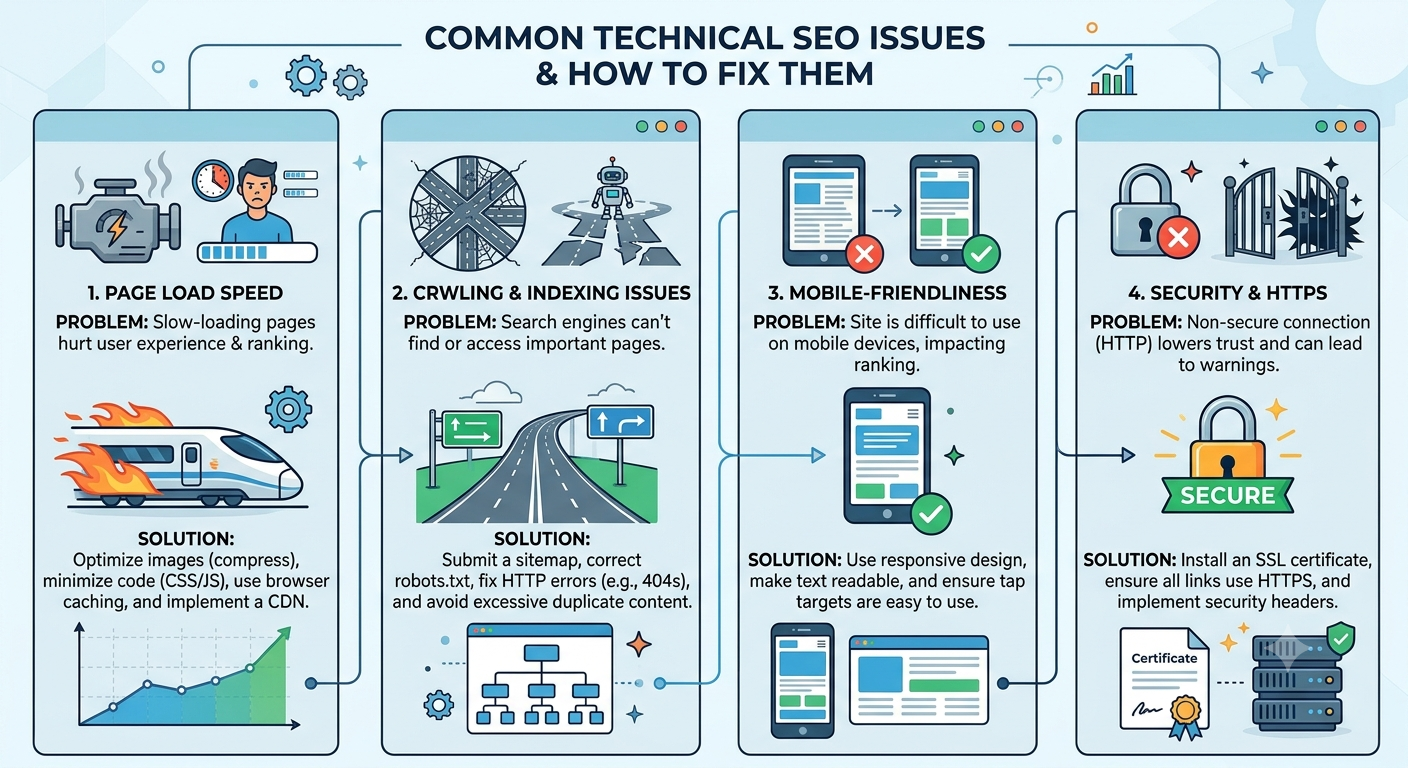
9. Slow Page Speed and Weak Core Web Vitals
Speed shapes both rankings and conversions. Google’s Core Web Vitals measure loading (Largest Contentful Paint), responsiveness (Interaction to Next Paint), and layout stability (Cumulative Layout Shift). Heavy images, bulky scripts, and slow servers are the usual culprits.
How to fix it:
- Compress images and use modern formats such as WebP or AVIF.
- Set explicit width and height on images and embeds to prevent layout jumps.
- Lazy-load images and videos that sit below the fold.
- Minify CSS and JavaScript, and defer scripts that are not needed for the first view.
- Use browser caching and a content delivery network, and upgrade hosting if the server is slow to respond.
10. Mobile Usability Problems
Google predominantly uses the mobile version of a page for indexing and ranking. If content, links, or structured data are missing on mobile, they may effectively not exist for search purposes. Small tap targets and unreadable text also hurt the experience.
How to fix it:
- Use a responsive design so one URL serves all devices.
- Keep content, headings, links, and markup consistent between mobile and desktop.
- Make buttons and links large enough to tap comfortably, and use readable font sizes.
- Avoid intrusive pop-ups that cover the main content on small screens.
11. JavaScript Rendering Obstacles
Modern sites often build their content in the browser with JavaScript. Search engines can process it, but rendering takes extra time and can fail. Content that appears only after a click or scroll may never be seen, and links created without proper anchor tags may not be followed. These are some of the harder technical SEO issues to spot because the page looks perfect in your browser.
How to fix it:
- Use the URL Inspection tool to compare the rendered HTML with what you expect.
- Prefer server-side rendering or pre-rendering for important content.
- Use real <a href> links for navigation.
- Make sure critical resources are not blocked from crawling.
12. Missing or Incorrect Structured Data
Structured data (schema markup) helps search engines understand what a page is about and can make you eligible for enhanced results such as review stars, FAQs, and product details. Errors in the markup mean you lose that opportunity, and misleading markup can trigger penalties.
How to fix it:
- Add the schema type that matches the page, such as Article, Product, LocalBusiness, or FAQPage.
- Make sure the markup reflects content that is visible on the page.
- Validate it with Google’s Rich Results Test and fix warnings.
- Monitor enhancement reports in Search Console for new errors.
13. HTTPS and Security Weaknesses
Secure connections are a baseline expectation. Expired certificates trigger browser warnings that scare visitors away, and mixed content (an HTTPS page loading HTTP resources) can break features and erode trust.
How to fix it:
- Serve every page over HTTPS and redirect all HTTP versions permanently.
- Renew certificates automatically so they never lapse.
- Update hard-coded HTTP links, images, and scripts to HTTPS.
- Add security headers and keep your CMS and plugins updated.
14. Unclear URL Structure
Messy URLs full of parameters, session IDs, and random characters are harder to crawl and harder for people to trust. Inconsistent structures also make duplicate pages more likely.
How to fix it:
- Use short, readable, lowercase URLs that describe the page.
- Reflect your site hierarchy logically, without excessive depth.
- Avoid changing URLs after publishing, and redirect properly if you must.
15. Hreflang and International Setup Errors
Sites serving several languages or regions use hreflang tags to show which version suits which audience. Missing return tags, wrong language codes, and conflicting canonicals are frequent mistakes that cause the wrong version to appear, or none at all.
How to fix it:
- Make sure every language version links back to the others (reciprocal tags).
- Use valid language and region codes.
- Include a self-referencing hreflang entry on each page.
- Keep canonical tags and hreflang tags consistent with each other.
16. Pagination and Faceted Navigation Traps
Filters on category pages can generate thousands of near-duplicate URLs, such as every combination of size, color, and price. Bots may spend their time on these low-value combinations instead of your key pages.
How to fix it:
- Decide which filtered pages deserve to rank, and make only those indexable.
- Block or canonicalize low-value combinations.
- Keep paginated pages crawlable through plain links.
- Give each paginated page a unique title and a clear connection to the main category.
How to Prioritize Your Fixes
Trying to repair everything at once is a recipe for stalled projects. Work in layers, because each one depends on the one before it.
- Access: Fix robots.txt blocks, server errors, and broken redirects so bots can reach your pages.
- Indexing: Remove accidental noindex tags, clean up canonicals, and tidy your sitemap.
- Structure: Repair internal linking, orphan pages, and URL patterns.
- Experience: Improve speed, mobile usability, and security.
- Enhancements: Add structured data and refine international settings.
Within each layer, rank tasks by impact and effort. A single robots.txt correction that unblocks a whole directory beats a month of image compression. Use a simple scoring system: how many pages are affected, how important are those pages to revenue, and how hard is the fix? Starting with high-impact, low-effort items builds momentum and shows quick wins to stakeholders. This is the most reliable way to turn a long list of technical SEO issues into a manageable plan.
Special Considerations for Large and Ecommerce Sites
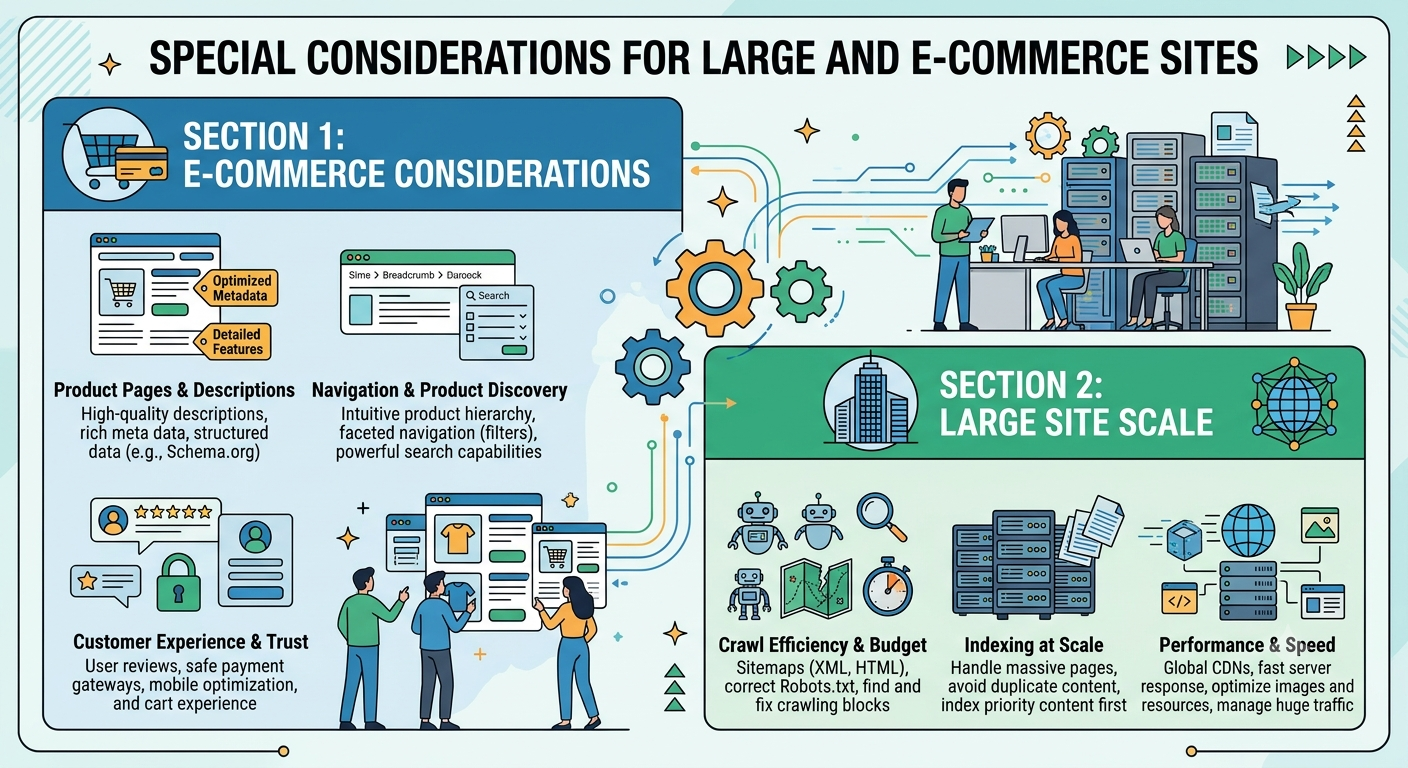
The bigger the site, the more these problems multiply. A product catalog with tens of thousands of URLs introduces challenges that small blogs rarely face: crawl budget, expired products, out-of-stock pages, faceted filters, and duplicate descriptions supplied by manufacturers.
A few principles help:
- Protect crawl budget. Keep bots focused on valuable pages by controlling parameters, removing thin pages, and avoiding endless URL combinations.
- Handle discontinued products thoughtfully. Redirect to a close alternative or parent category when the product is gone for good, and keep the page live with clear messaging when stock is only temporarily out.
- Write unique product content. Replace copied manufacturer text with original descriptions, specifications, and helpful details.
- Use templates wisely. One flawed template can replicate a mistake across thousands of pages, so test changes on a small group first. At this scale, fixing technical SEO issues is as much about processes and monitoring as about individual pages.
When to Bring in Professional Help
Some problems are beyond what a marketing team can solve alone. JavaScript-heavy builds, complex migrations, and massive catalogs often require developer time and specialized audit experience. If you are short on either, outside support can save months of trial and error. Reviewing the best technical seo services for fixing crawlability and indexing issues can help you shortlist a partner.
Many of the fixes in this guide, such as template changes, server-side rendering, and speed improvements, need hands-on engineering. If your team lacks that capacity, an experienced web development team can implement the changes cleanly and make sure they don’t break anything else on the site.
When comparing providers, look for ones that:
- Deliver a clear, prioritized audit instead of a generic checklist
- Explain each recommendation in plain language and show the evidence behind it
- Collaborate with your developers and understand your platform
- Report on indexing, crawl health, and organic performance rather than just tasks completed
- Offer ongoing monitoring, not only a one-time fix
Be cautious of anyone promising guaranteed rankings. Good technical work removes obstacles, but rankings still depend on content quality, authority, and competition.
Protecting Rankings During Site Migrations and Redesigns
Many ranking collapses happen during a redesign, platform switch, or domain change. A migration touches URLs, templates, redirects, and internal links all at once, so it is the moment when new technical SEO issues are most likely to appear.
Follow a careful process:
- Crawl and benchmark first. Record your current URLs, rankings, traffic, and top-performing pages before anything changes.
- Build a redirect map. Match every old URL to its best new equivalent with a one-to-one 301 redirect.
- Test on staging. Check templates, tags, canonicals, and robots rules, but make sure the staging site itself is blocked from search engines.
- Remove staging blocks at launch. Verify that noindex tags and disallow rules from the test environment are gone.
- Monitor closely afterward. Watch indexing, errors, and traffic daily for the first few weeks, and fix anything unexpected quickly.
How to Measure Whether Your Fixes Worked
Do not assume a change worked just because you made it. Track results with specific indicators:
- Indexed pages: The Page Indexing report in Search Console should show more valid pages and fewer exclusions over time.
- Crawl stats: Look for fewer errors, faster server response, and healthy crawl activity.
- Core Web Vitals: More URLs should move into the “Good” category.
- Organic impressions and clicks: Expect gradual improvement over several weeks, not overnight jumps.
- Rankings for target pages: Track the specific pages you repaired, not just sitewide averages.
Remember that search engines need time to recrawl and reassess. Use the “Validate Fix” option in Search Console where available, and give changes a few weeks before judging them. Keeping a simple change log with dates helps you connect improvements to specific actions, and it makes it easier to reverse anything that backfires.
Building a Routine That Prevents Problems
Fixing the backlog is only half the job. Sites change constantly, and new faults appear whenever someone publishes content, installs a plugin, or updates a template. A light, repeatable routine keeps things healthy.
- Monthly: Run a full crawl, review Search Console reports, and check for new errors.
- Before every release: Add an SEO check to your launch process covering tags, redirects, and robots rules.
- Quarterly: Review site speed, structured data, and internal linking on your most important pages.
- Whenever things change: Re-audit after migrations, redesigns, and major plugin or platform updates.
It also helps to give people clear ownership. Developers, content editors, and marketers should know who handles which type of fix, so that problems do not sit unresolved in a shared inbox. Shared task boards and review workflows make this much easier, and this guide to management tools for software developers is a useful starting point for choosing a setup. Teams that treat technical SEO issues as part of everyday quality control, instead of an annual emergency, spend far less time firefighting.
Common Mistakes to Avoid
Even well-meaning teams stumble in a few predictable ways:
- Fixing symptoms instead of causes. Repairing one broken page while the template that created it stays unchanged guarantees the problem returns.
- Blocking resources to “save” crawl budget. Hiding scripts or stylesheets can stop search engines from rendering your pages properly.
- Mass-deleting pages without redirects. This throws away accumulated authority and creates fresh 404 errors.
- Ignoring mobile. Checking only the desktop view can hide real indexing problems.
- Relying on one tool. Each tool has blind spots, so cross-check important findings.
- Making many changes at once. If several things change together, you cannot tell what helped or hurt.
Frequently Asked Questions
How long does it take to see results after fixing these problems?
It varies. Indexing fixes can show results within days or weeks once pages are recrawled, while improvements tied to speed and overall site quality can take a month or more to show up in rankings.
Do I need a developer to handle this?
Some tasks, such as updating a sitemap, fixing titles, or removing a noindex tag, can be done through your CMS. Others, such as server configuration, rendering changes, and template fixes, usually need developer support.
How often should I run a technical audit?
A light check each month and a thorough audit every quarter suit most sites. Run an extra one after any major change.
Can technical fixes alone make a page rank?
Not by themselves. They remove barriers and let your content compete fairly. Helpful content, relevance to search intent, and authority still decide how high you rank.
Final Thoughts on Fixing Technical SEO Issues
Technical SEO issues rarely announce themselves. They hide in settings, scripts, and templates until traffic stalls and nobody can say why. The encouraging part is that they follow patterns, and patterns can be found, prioritized, and fixed.
Start with a clean audit. Fix what blocks crawling and indexing first, then move on to structure, speed, and enhancements. Verify every change, build a simple monthly routine, and bring in specialists when the work outgrows your team. Do this consistently, and pages that once sat invisible can start earning the rankings their content deserves.